This article was co-authored with generative AI. Facts have been checked against public documentation where feasible, but errors may remain. Please verify primary sources before relying on this for important decisions.
To avoid pointing at any specific operator, this article redacts the target site's domain, paths, and identifiers with placeholders (like
museum.example). The purpose is to record the technical structure, not to present a procedure for harvesting from a specific site.
What I investigated and my conclusions
I looked into whether images and metadata for a certain public collection (a museum) can be retrieved via API. Within the scope of my investigation, the conclusions are as follows.
- Metadata can be retrieved via the official JSON API (no key required, and use is officially sanctioned)
- Image URLs are not included in that API's responses
- Images live on a separate-domain CDN (delivered by a DAM product), and their URLs appear only inside the HTML of the object detail pages
- The detail pages are subject to Cloudflare Bot Fight Mode, and plain
curlor a headless browser gets a 403 - robots.txt places automated crawling of the detail pages out of scope (Disallow)
What I found interesting was that "is it public," "can it be retrieved machine-readably," and "is retrieval permitted" turned out to be three separate questions, so I am leaving this as a record of the investigation. Note that out of respect for the robots.txt policy, I did not perform a full harvest or build a dataset.
Metadata can be retrieved via the official API
The operator publishes an official collection API. According to the documentation, it requires no key and has no rate limit (at present).
https://museum.example/api/v1/collection?search_api_fulltext=<search term>
- You narrow results by passing a search term to
search_api_fulltext(with no search term given, a default listing was returned) - 10 items per page, paged with
page=
One record in the returned JSON has the following structure (28 fields; values replaced with placeholders).
{
  "id": "<object-id>",
  "title": "<作品タイトル>",
  "primaryMaker": "<作者名>",
  "makers": [{ "name": "<作者名>", "years": "<生没年・出身>", "nationality": ["<国籍>"] }],
  "medium": ["<技法・素材>"],
  "datingYearFrom": "<制作年>", "datingYearTo": "<制作年>",
  "dimensions": "<寸法>",
  "objectNumber": "<整理番号>",
  "publicDomain": null,
  "type": ["<分類>"],
  "url": "https://museum.example/collection/<slug>"
}
As metadata it is sufficiently rich, but there is no image URL field. What it has is the url to the object page and the publicDomain flag.
Where the images live
Opening the url object detail page and inspecting the <img> tags, the images were all delivered from a separate domain.
https://<alias>.cdn.picturepark.com/v/<8-char token>/
These are delivery URLs from Picturepark Content Platform, a DAM (Digital Asset Management) product (now under Fotoware, apparently being renamed to "Fotoware Alto"). <alias> is a per-subscriber subdomain. As far as I investigated, this token is not included in the API responses and was embedded only in the HTML of the detail pages.
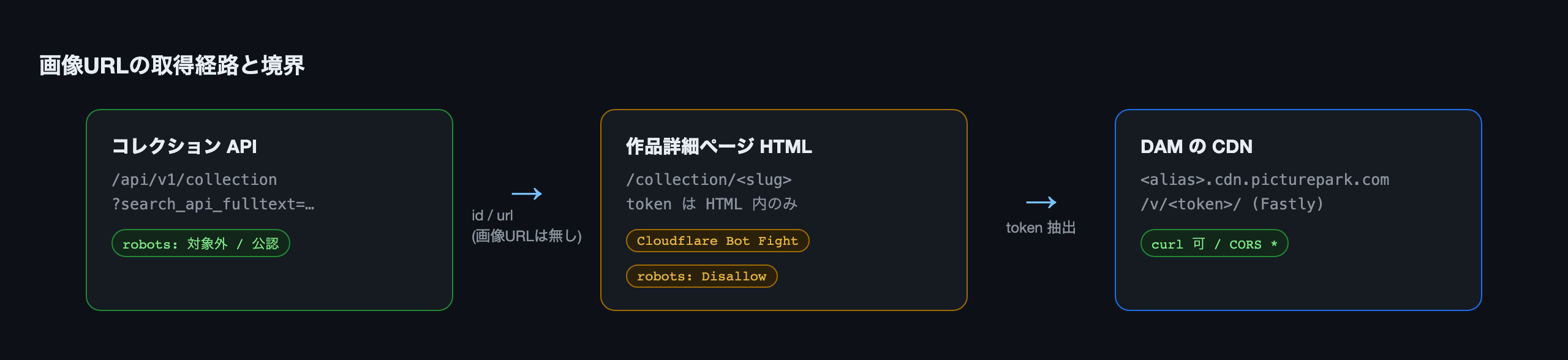
The path to obtaining an image URL is therefore as follows.
Get id and url from the API
  → fetch the detail page HTML at url
    → extract <alias>.cdn.picturepark.com/v/<token>/ from the HTML
The behavior of Cloudflare Bot Fight Mode
Fetching that detail page took an extra step.
$ curl -s -o /dev/null -w "%{http_code}\n" https://museum.example/
403
Even setting the User-Agent to Chrome, and even adding Accept and Referer, it returned 403. The whole domain returns 403 against plain curl (Cloudflare's "Sorry, you have been blocked" response).
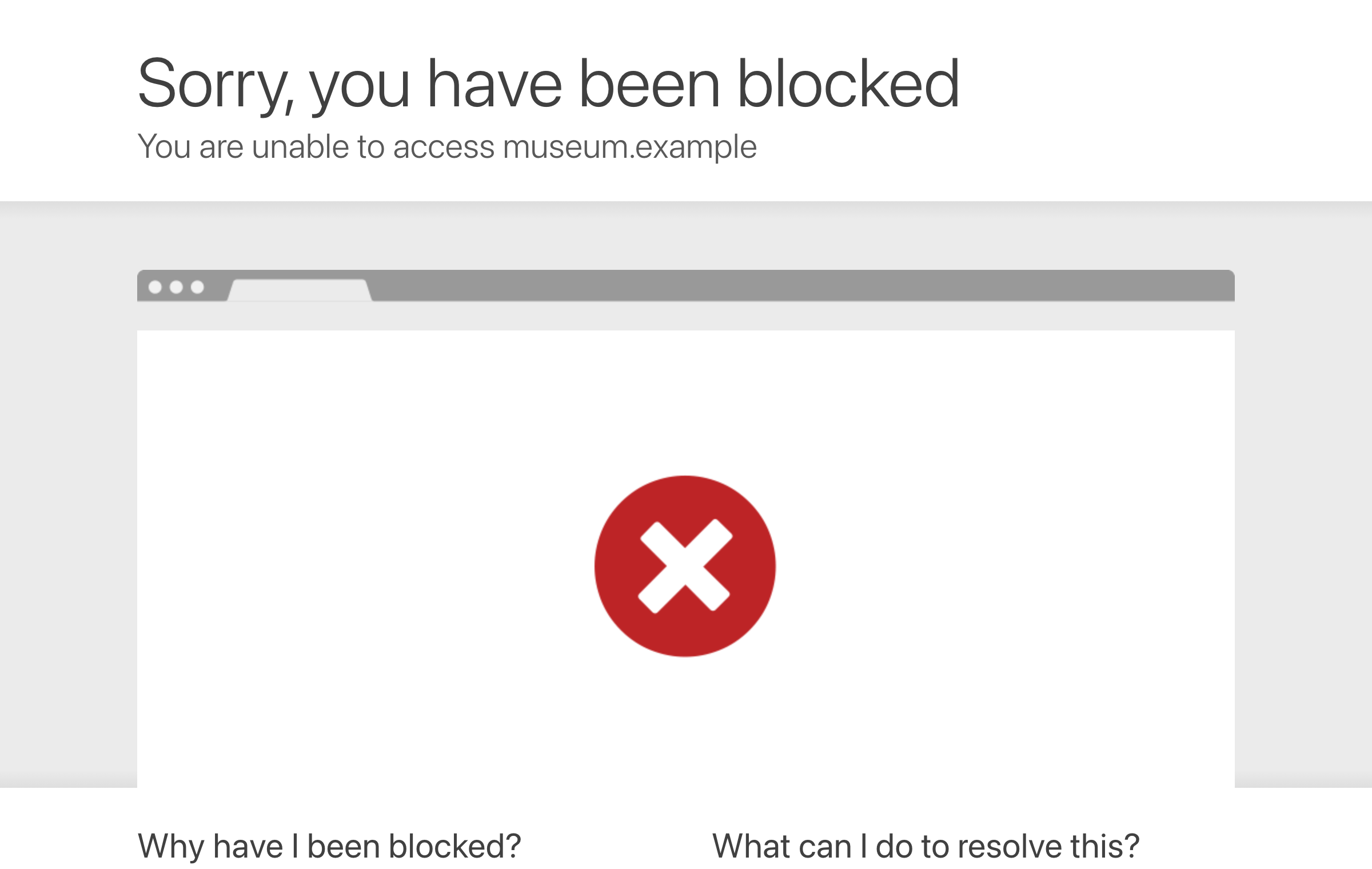
It seems to judge on the TLS/browser fingerprint rather than headers, so headless Chrome (Playwright headless: true) also got 403. What stood out was that no cf_clearance cookie was issued. Rather than passing a cookie-based challenge, it appears to evaluate the fingerprint on each request, so the "pass once, then reuse the obtained cookie with curl" approach did not work this time.
What returned 200 was headed (real-window) Chrome.
import { chromium } from 'playwright';

const ctx = await chromium.launchPersistentContext('/tmp/profile', {
  channel: 'chrome',     // real Chrome
  headless: false,       // headless: true was blocked this time
});
const page = ctx.pages()[0] ?? await ctx.newPage();
await page.goto('https://museum.example/collection', { waitUntil: 'domcontentloaded' });
await page.waitForTimeout(2500);   // wait for the initial challenge to pass
Once the origin had been opened, calling fetch() from within that page passed Cloudflare, because it goes through Chrome's network stack. Using this, you can retrieve HTML without a full page render.
const tokens = await page.evaluate(async (url) => {
  const html = await (await fetch(url, { headers: { Accept: 'text/html' } })).text();
  return [...new Set([...html.matchAll(/picturepark\.com\/v\/([A-Za-z0-9]+)/g)].map(m => m[1]))];
}, detailUrl);
Observing the DAM tokens
From here is what I learned by actually measuring /v/<token>/ (token values and file names redacted).
Fixed tokens with no signature and no expiry
$ curl -sI https://<alias>.cdn.picturepark.com/v/<token>/
HTTP/2 200
content-type: image/jpeg
content-disposition: inline; filename=OBJ-00000.tif.jpg
etag: "<sha1>"
cache-control: no-cache
access-control-allow-origin: *
via: 1.1 varnish, 1.1 varnish
x-served-by: cache-fra-xxxxxxxx-FRA, cache-nrt-xxxxxxxx-NRT
x-cache: HIT, HIT
age: 591
- It was a path-only URL with no signature query or expiry. Rather than a temporary signed URL issued per render, it looks like a token assigned fixedly to an (asset × rendition).
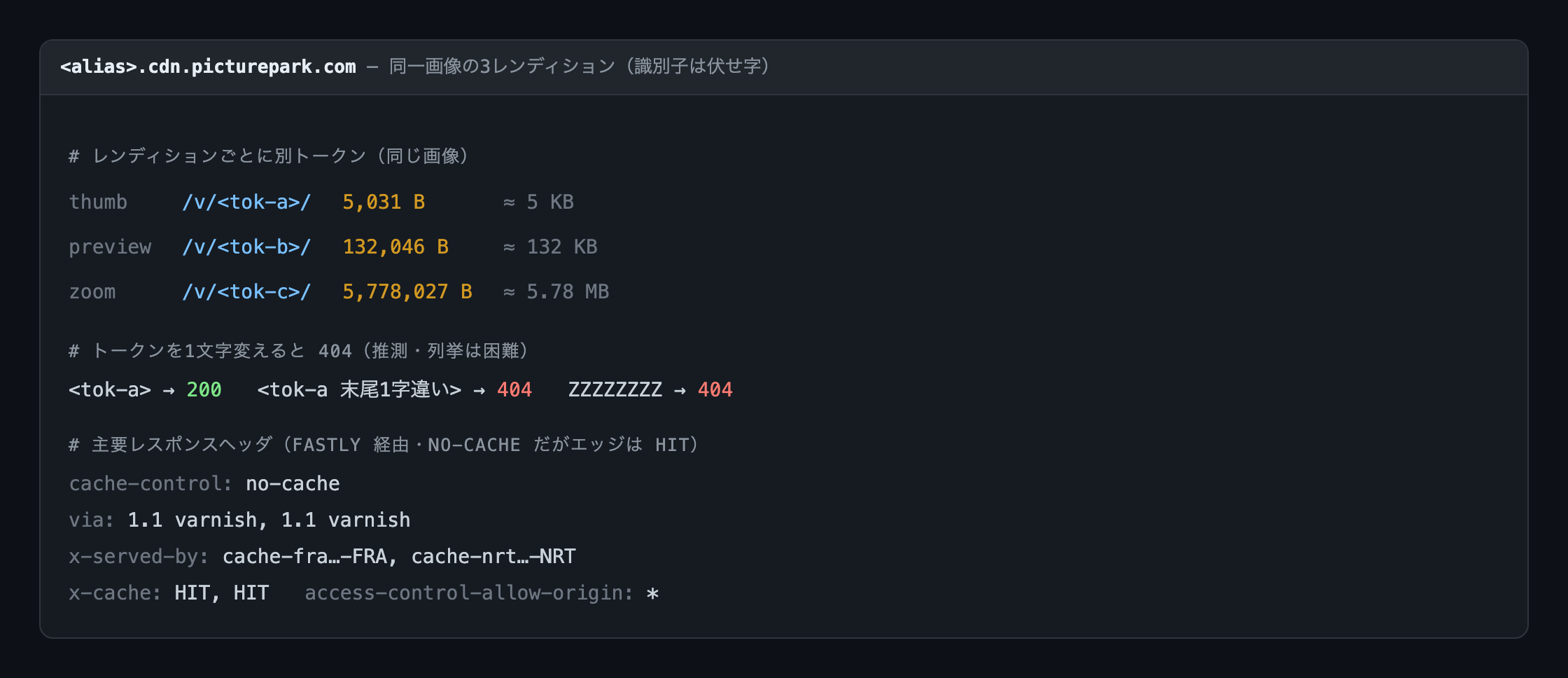
- Changing even one character of the token gave a 404. The space of 8 alphanumeric characters (base62) is about 2×10^14, so guessing or enumerating it currently appears difficult.
<token>              -> 200
<token with 1 char changed at end> -> 404
ZZZZZZZZ             -> 404
- While
cache-control: no-cachewas returned, the Fastly edge was HITting (agekeeps increasing). The setup seems to make the browser revalidate every time while the edge returns cache.via: 1.1 varnishindicates a Varnish-based cache and is not Fastly-exclusive, but the coexistence ofx-served-by: cache-*andx-cachesuggests Fastly.x-served-bywas two-tier, Frankfurt (FRA) and Tokyo (NRT). - The master is
.tifand delivery is a.tif.jpgderivative, with the accession number contained in the file name.
Each rendition has its own token per size
Adding ?width=2000 or ?size=Original returned the same byte count. Rather than a parametric scheme that specifies transforms in the URL like imgix (?w=2000-style query) or Cloudinary (/w_2000/-style path), the design seems to hold a separate token per size.
Looking at the detail page DOM, each view had three tokens.
| Rendition | Source | Size (measured on the same image) |
|---|---|---|
| thumb | img@src in the thumbnail column | about 5 KB |
| preview | div[data-preview-url] | about 132 KB |
| zoom | div[data-zoom-url] | about 5.78 MB |
Rather than changing the size via the URL, you pick up the token for the size you want from the HTML. Invalidation appears to be operated via Fastly purge rather than on the token side.
Narrowing to the object's own images
The detail page also contains many thumbnails of related objects (over 100 tokens on one page). The object's own media is inside div#carousel-node-<id>, and this <id> matched the API's id field.
const carousel = doc.querySelector('[id^="carousel-node-"]');   // the object's own media only
const cdn = t => `https://<alias>.cdn.picturepark.com/v/${t}/`;
const views = [...carousel.querySelectorAll('[data-zoom-url]')].map(el => ({
  zoom:    cdn(el.getAttribute('data-zoom-url').match(/\/v\/([A-Za-z0-9]+)/)[1]),
  preview: cdn(el.getAttribute('data-preview-url').match(/\/v\/([A-Za-z0-9]+)/)[1]),
}));
This gives you "ID → the URL for each of its views."
Whether a full harvest is possible
The collection search UI showed a total of over 100,000 items, of which about 80,000 were shown as viewable online. Considering a full harvest, there were constraints on both the technical and policy sides.
Technical side: means of enumerating everything
- With no search term given, the default 10 items were returned, and I found no query that returns everything at once (some terms even returned 0 items)
- The facet-narrowing parameters (
type=/f[0]=, etc.) did not seem to work on the API /sitemap.xml,/jsonapi,/api, and/rest/session/tokenall returned 404, so although it is Drupal, the standard data exits appear to be disabled within the public scope- Paging itself went deep (with one term, even past 60 pages / 600 items I did not hit a ceiling), but you can only reach items matching the term you gave
As far as I investigated, the only way to cover everything appeared to be "brute-force a dictionary of terms and dedupe by id," and I found no means to guarantee completeness.
Policy side: the robots.txt content
User-agent: *
Content-Signal: search=yes, ai-train=no      # crawling for AI-training purposes is out of scope (stated as a reservation of rights under EU DSM Directive Art. 4)
Crawl-delay: 10
Disallow: /collection                        # detail pages and search are Disallow targets
Disallow: /site-search

User-agent: ClaudeBot   Disallow: /
User-agent: GPTBot      Disallow: /
User-agent: CCBot       Disallow: /
# AI-related crawlers like Amazonbot, Google-Extended, and meta-externalagent are similarly handled
The detail-page paths needed to extract image URLs are among the Disallow targets in robots.txt. In addition, Crawl-delay: 10 is specified.
On the other hand, the metadata API endpoint is not in Disallow, and the operator itself invites free use. Organizing this gives the following.
| Purpose | Feasibility |
|---|---|
| Metadata (individual / small volume) | Retrievable via API (sanctioned) |
| Metadata, everything | Approximable by brute-forcing terms; completeness cannot be guaranteed |
| Image URL list (everything) | Requires fetching detail pages, which are Disallow targets in robots.txt |
Takeaways from the investigation
Technically I confirmed that image URLs can be extracted from the detail pages, but because robots.txt makes the detail pages a Disallow target, out of respect for the intent of the policy I did not adopt full automated harvesting. The API is the legitimate route, and the detail-page methods in this article are only to explain the structure. If full data is needed, one option is to consult the operator directly about a data provision, rather than harvesting.
What I was able to confirm through the investigation is the following.
- Publishing images and providing image URLs machine-readably were separate things. The metadata API is public, while image URLs are not on the API and are held as DAM tokens inside the HTML
- Cloudflare Bot Fight Mode may judge on fingerprint rather than cookies. The "obtain
cf_clearanceand reuse it" method did not work, and there were situations that required a real browser - Even for an organization that flies the open-data banner, checking robots.txt was necessary. In recent years,
Content-Signal(crawl-permission signals) and per-crawler Disallow for AI-related crawlers are increasing, and "public" and "OK to harvest" are being distinguished
"Is it public," "can it be retrieved via API," and "is retrieval permitted" were each separate questions.
This article's investigation was for the purpose of technical verification. Out of respect for the target site's robots.txt policy, I did not perform a full harvest or build a dataset. The target's identifiers are redacted.
Comments
…