This article was co-authored with generative AI. Facts have been checked against public documentation where feasible, but errors may remain. Please verify primary sources before relying on this for important decisions.
I had an opportunity to consider long-term preservation of CAD (computer-aided design) data, so I created sample CAD data using only OSS tools, ingested it into Archivematica, and confirmed how the format is identified in the METS inside the AIP (Archival Information Package). This is a record of the procedure and results.
The verification environment is Archivematica's development Docker stack (hack/) on Apple Silicon macOS. The points I stumbled on while building the stack are summarized in a separate article.
Organizing Preservation Formats for CAD Data
For long-term preservation of CAD, the U.S. Library of Congress's Recommended Formats Statement lists STEP, IFC, DXF, PDF/A, and others as preferred / acceptable formats. Based on this, this article organizes the normalization targets as follows (glTF for viewing is not included in the Recommended Formats Statement, but I add it as a widely used option for web delivery).
| Source data | For preservation | For viewing |
|---|---|---|
| 3D CAD (DWG, SLDPRT, etc.) | STEP (ISO 10303) | STL / glTF |
| 2D drawings (DWG, DXF) | PDF/A + DXF | same as left |
| BIM (Building Information Modeling) | IFC (ISO 16739) | glTF |
STEP (Standard for the Exchange of Product model data) is an ISO-standardized neutral format that can hold B-rep (boundary representation) geometry. On the other hand, since parametric design history such as fillet radii and sketch constraints is not preserved, the basic practice is to keep the original file alongside rather than discard it.
Generating a Sample Part with build123d
For creating the sample data, I used build123d. It is a library that lets you operate the CAD kernel Open CASCADE Technology from Python, describe a solid model in code, and export to STEP or STL (Standard Tessellation Language).
uv venv cadtry --python 3.12
VIRTUAL_ENV=$PWD/cadtry uv pip install build123d
I generated a mounting bracket (base plate + boss + countersunk mounting holes) with the following script.
from build123d import (
    Align, Axis, BuildPart, Box, CounterBoreHole, Cylinder, Hole,
    Locations, fillet, export_step, export_stl,
)

PLATE_W, PLATE_D, PLATE_H = 80, 60, 8
CORNER_R = 10
HOLE_POS = [(30, 20), (-30, 20), (30, -20), (-30, -20)]
BOSS_R, BOSS_H = 16, 22
BORE_R = 8

with BuildPart() as bracket:
    Box(PLATE_W, PLATE_D, PLATE_H)
    fillet(bracket.edges().filter_by(Axis.Z), radius=CORNER_R)

    with Locations((0, 0, PLATE_H / 2)):
        Cylinder(BOSS_R, BOSS_H, align=(Align.CENTER, Align.CENTER, Align.MIN))

    boss_base = bracket.edges().filter_by(Axis.Z, reverse=True).group_by(Axis.Z)[-2]
    fillet(boss_base, radius=3)

    Hole(BORE_R)

    with Locations(*[(x, y, PLATE_H / 2) for x, y in HOLE_POS]):
        CounterBoreHole(radius=3.2, counter_bore_radius=6, counter_bore_depth=3)

export_step(bracket.part, "bracket.step")
export_stl(bracket.part, "bracket.stl", tolerance=0.05)
Since dimensions and hole positions are held as variables, rewriting the values and re-running makes the shape follow along. Looking at the header of the generated STEP, the schema was AP214 (AUTOMOTIVE_DESIGN { 1 0 10303 214 ... }).
FILE_SCHEMA(('AUTOMOTIVE_DESIGN { 1 0 10303 214 1 1 1 1 }'));
The following image shows the STL displayed in a simple WebGL viewer for browser confirmation.
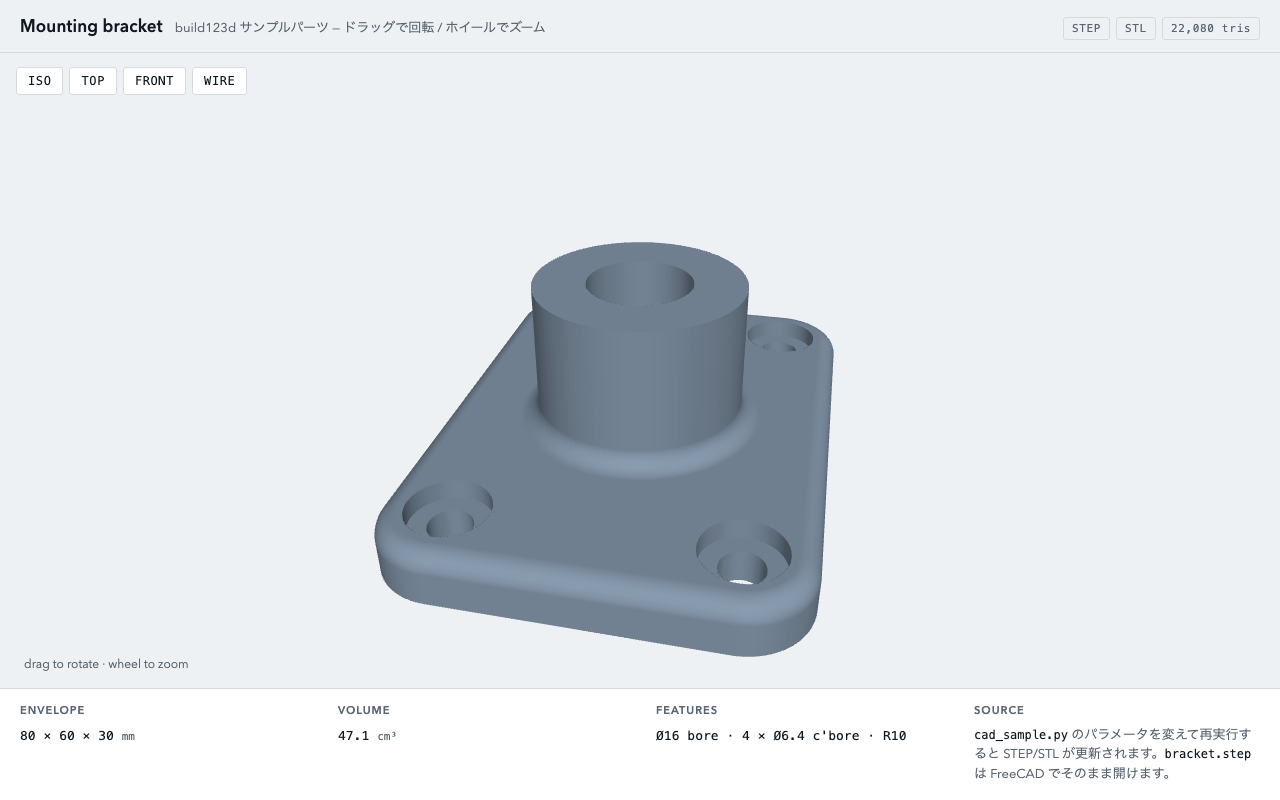
Since this script itself is text containing the parameters and shape definition, this time I made the ingest target a folder bundling a three-piece set of "original = Python script, for preservation = STEP, for viewing = STL."
cad-bracket-sample/
├── cad_sample.py     # original (text representation of design parameters)
├── bracket.step      # for preservation (ISO 10303-21, AP214)
└── bracket.stl       # mesh for viewing
Ingesting into Archivematica
I placed the folder in the transfer source (this time under the storage service's /home) and started the transfer with the Dashboard's /api/v2beta/package endpoint. path is a Base64 value of "the transfer source's UUID + a colon + the relative path." Specifying automated in the processing configuration advances everything from approval to AIP storage automatically.
TS=842228fc-8750-489e-9d9b-9f9ccca0f881
REL='archivematica/archivematica-sampledata/cad-bracket-sample'
PATH_B64=$(printf '%s' "${TS}:${REL}" | base64)
curl -s -X POST http://localhost:62080/api/v2beta/package \
  -H "Authorization: ApiKey test:test" \
  -H 'Content-Type: application/json' \
  -d "{\"name\": \"cad-bracket-sample\", \"type\": \"standard\", \"path\": \"$PATH_B64\", \"processing_config\": \"automated\"}"
As a side note, in zsh, writing a colon immediately after a variable like "$TS:archivematica/..." caused :a to be expanded as a modifier (making it an absolute path), breaking the path. You need to delimit it with braces as ${TS}.
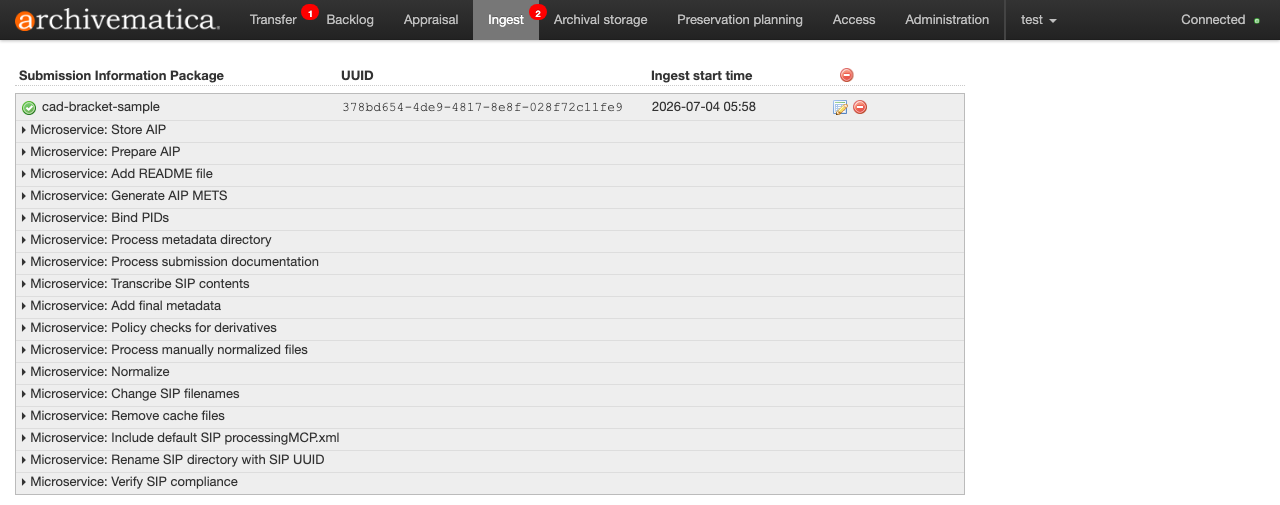
The transfer and ingest states can be tracked with /api/transfer/status/<uuid> and /api/ingest/status/<uuid> respectively. For this data, it became COMPLETE in a few tens of seconds, and the AIP was stored in 7-Zip format (about 293 KB, original data about 1.2 MB).
Format Identification Results in METS
From the stored AIP, I extracted the METS with the Storage Service's extract_file API.
SIP=378bd654-4de9-4817-8e8f-028f72c11fe9
curl -s -H "Authorization: ApiKey test:test" \
  "http://localhost:62081/api/v2/file/$SIP/extract_file/?relative_path_to_file=cad-bracket-sample-$SIP/data/METS.$SIP.xml" \
  -o aip-mets.xml
Looking at the PREMIS in the METS, all three files were identified with a PRONOM PUID (PRONOM Unique Identifier).
| File | Identified format | PUID |
|---|---|---|
| bracket.step | Standard for the Exchange of Product model data | fmt/698 |
| bracket.stl | STL (Standard Tessellation Language) Binary | fmt/865 |
| cad_sample.py | Python Script File | fmt/938 |
The format names in the table show the values recorded in the METS as-is. In the current PRONOM registry, the name for fmt/938 has been updated to Python Source Code File, but since Archivematica writes to PREMIS with the name registered in its internal FPR, it reads Python Script File in the METS.
I also excerpt the relevant part of the actual METS. In bracket.step's premis:objectCharacteristics, following the checksum and size, the format name and PUID are recorded.
<premis:objectCharacteristics>
  <premis:compositionLevel>0</premis:compositionLevel>
  <premis:fixity>
    <premis:messageDigestAlgorithm>sha256</premis:messageDigestAlgorithm>
    <premis:messageDigest>1e0eb4c6b9bfc14524e6252a875a285eb0a2d57dab2d56265b1a5cc32ecdf9ec</premis:messageDigest>
  </premis:fixity>
  <premis:size>101689</premis:size>
  <premis:format>
    <premis:formatDesignation>
      <premis:formatName>Standard for the Exchange of Product model data</premis:formatName>
    </premis:formatDesignation>
    <premis:formatRegistry>
      <premis:formatRegistryName>PRONOM</premis:formatRegistryName>
      <premis:formatRegistryKey>fmt/698</premis:formatRegistryKey>
    </premis:formatRegistry>
  </premis:format>
</premis:objectCharacteristics>
The format identification PREMIS event records that the identification tool was Siegfried 1.11.2 and the determination result (the linkingAgent is Archivematica-1.18).
<premis:eventType>format identification</premis:eventType>
<premis:eventDateTime>2026-07-03T20:58:13.501712+00:00</premis:eventDateTime>
<premis:eventDetailInformation>
  <premis:eventDetail>program="Siegfried"; version="1.11.2"</premis:eventDetail>
</premis:eventDetailInformation>
<premis:eventOutcomeInformation>
  <premis:eventOutcome>Positive</premis:eventOutcome>
  <premis:eventOutcomeDetail>
    <premis:eventOutcomeDetailNote>fmt/698</premis:eventOutcomeDetailNote>
  </premis:eventOutcomeDetail>
</premis:eventOutcomeInformation>
The PREMIS events for each file were four kinds — format identification / virus check / message digest calculation / ingestion — and there was no normalization event. In other words, the default FPR (Format Policy Registry) has no normalization rules for CAD-family formats, and the original is preserved unchanged in the AIP. For this method, where STEP is prepared before ingest, this is desirable behavior.
A Configuration That Normalizes Before Ingest
From this confirmation, CAD preservation can be organized as follows.
- If you ingest in neutral formats such as STEP, STL, and Python scripts, no additional configuration is needed on the Archivematica side, and the METS records the identification results with PUIDs
- Since the PUID remains in the METS, even if format obsolescence becomes a problem in the future, an operation that identifies the target AIP using the PUID as a clue and re-converts it is feasible
- If you accept vendor-specific formats like DWG, conversion becomes necessary. Besides adding custom rules to the FPR, there is also a method of converting to STEP and so on and placing it alongside in the pipeline before ingest. As far as I investigated, the OSS LibreDWG supports reading DWG of all versions (some advanced objects from R2010 onward are skipped), but writing is stable only for R2004 and earlier, and at present many cases use it together with ODA File Converter (distributed for free, but non-ODA-members are limited to non-commercial use and it is non-OSS)
The build123d execution environment (Open CASCADE) used this time can also serve directly as an engine for reading/writing STEP and producing STL, so I think it is also an option as a component when containerizing pre-ingest normalization.
The full set of samples from this time (the build123d script, STEP, STL, and the METS extracted from the AIP) is published under CC0 at nakamura196/archivematica-cad-sample. Please use it for verifications such as ingesting the same transfer and reproducing the format identification.


Comments
…