概要
Omeka SにGoogle Analyticsを設定するモジュールとして以下があります。
Omeka S
- Google Analytics
Omeka is a free, flexible, and open source web-publishing platform for the display of library, museum, archives, and scholarly collections and exhibitions. Its five-minute setup makes launching an online archive or exhibition as easy as launching a blog.
2023年4月時点では上記のモジュールもGA4に対応していますが、2022年4月時点では以下の記事にある通り、非対応だったようです。

Google Analytics 4 gtag.js
Here’s a tip to integrate the new Google Analytics 4 service into the area of your Omeka S installation. Note the current plugin doesn’t support it yet. Install the “Analytics Plugin” Go to ‘Settings’ in the admin of your site and scroll down until you find the right section. Paste the code for the global site tag (gtag.js) that you can find in the ‘Data Streams’ area of your Google Analytics account. Please visit my site Whatcom Digital Commons and give some of that sweet sweet analytics ...
 Omeka Forum
そこで、以下のモジュールが紹介されていたので、試してみます。
Omeka S
- Analytics Snippet
Omeka is a free, flexible, and open source web-publishing platform for the display of library, museum, archives, and scholarly collections and exhibitions. Its five-minute setup makes launching an online archive or exhibition as easy as launching a blog.
なお、繰り返しになりますが、2023年4月時点では、冒頭のモジュールもGA4に対応していますので、Google Analyticsの設定にあたり、どちらのモジュールを使用してもよさそうです。
インストール
一般的なインスール方法と同様です。今回は、version=3.3.3.4をインストールします。
cd /modules
version=3.3.3.4
wget https://github.com/Daniel-KM/Omeka-S-module-AnalyticsSnippet/releases/download/$version/AnalyticsSnippet-$version.zip
unzip AnalyticsSnippet-$version.zip
設定
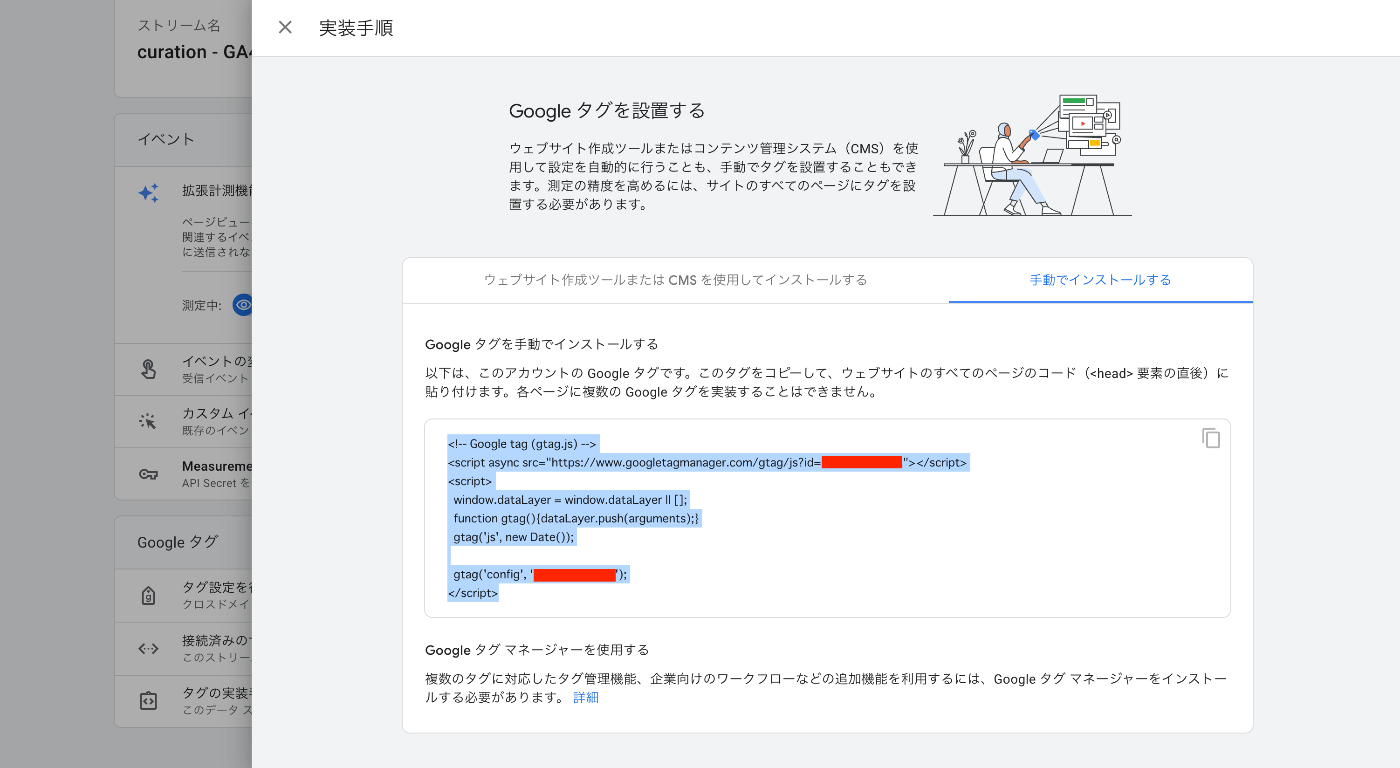
サイトの設定画面で、コードを貼り付けます。

コードは、Google Anayticsの設定画面から取得です。
まとめ
Omeka SにGA4を設定する際の参考になりましたら幸いです。
動画版(生成AIによる自動生成): この記事の内容をずんだもん×四国めたんの掛け合いで解説しています。自動生成のため、内容に誤りがある可能性があります。正確な情報は記事本文をご参照ください。

コメント
…