This article was co-authored with generative AI. Facts have been checked against public documentation where feasible, but errors may remain. Please verify primary sources before relying on this for important decisions.
We run a multilingual site on Drupal 10, with Japanese as the default language and English served under /en.
A request came in to edit the English version of a static page. An editor logged into the CMS and opened the page, but there was no screen for editing the English content.
It is tempting to jump straight to "if you can't edit it, it must be permissions," but in reality several conditions were stacked before you even reach the permission check. Drupal's Content Translation requires a number of independent conditions to be satisfied before the translation form appears at all; if any one of them is missing, the form never shows up. This article records how I isolated and resolved them.
The symptoms
The observable facts were these two:
- With the editor's account, the page had no link to add a "Translate" entry
- With an administrator account, the same page did show the translate link
The gap — "shows for admins, not for the editor" — is a hint that points toward permissions. But as described below, the content type of this page was not enabled for translation to begin with, so at first the Translate tab did not appear even for administrators. In other words, permissions were not the only cause.
Enable translation per content type
Drupal's translation is not a single site-wide switch; it is enabled individually per content type (bundle). The setting lives here:
/admin/config/regional/content-language
Checking this page, most content types had translation enabled, but the "basic page" type used here was the only one not enabled. A content type that is not enabled for translation shows the "Translate" tab to no one. Not appearing even for an administrator is the intended behavior.
Check "Translatable" for the content type, check the fields you want to translate (title and body), and save; the Translate tab then appears. Immediately after this operation, the administrator account could add a translation.
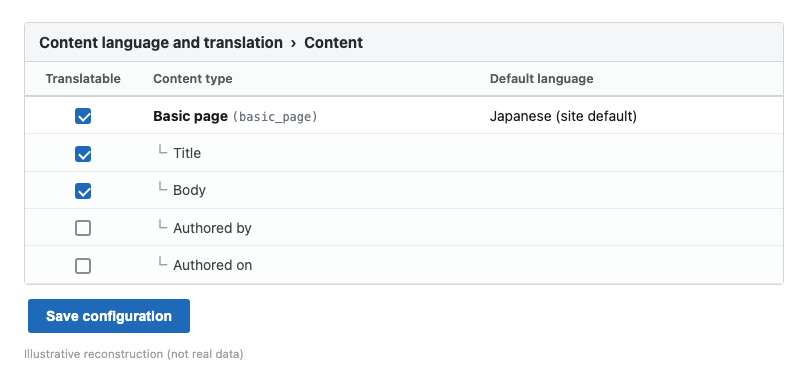
On save, Drupal synchronously installs the translation metadata fields (translation source, outdated flag, and so on), clears the bundle info cache, and rebuilds routing (this is not processed via the Batch API). In most cases the cache is rebuilt at this point, but if the tab does not appear, clearing the cache once on the following page makes it show up.
/admin/config/development/performance
"Being able to edit" and "being able to translate" are different permissions
Even after enabling translation for the content type, the editor's account still did not show the Translate tab. The difference — shows for admins but not for the editor — is what matters here.
The confusing part is that this editor's role already held the permission to edit the target content type. That is, they can edit the Japanese body. The reason they still cannot translate is that in Drupal, "the permission to edit content" and "the permission to translate content" are separate.
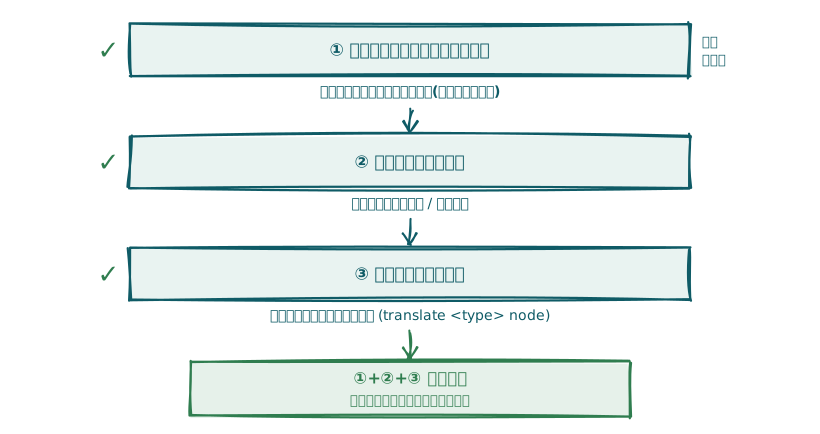
Furthermore, the translation permissions themselves are split into two layers:
- Action permissions … "create" / "update" content translations
- Target permissions … which content type may be translated (
translate <type> node)
These two form an AND condition. If you "can create/edit translations but no type is a valid target," or the reverse, you cannot reach the translation form. The target permission appears as a new row in the permissions list precisely because we enabled translation for the content type earlier.
As an exception, note that Drupal 9.1 and later has a "Translate editable entities (translate editable entities)" permission; granting it lets a user translate any content they can edit, without the two layers above. In this case we did not use that permission and chose to grant the action and target permissions explicitly.
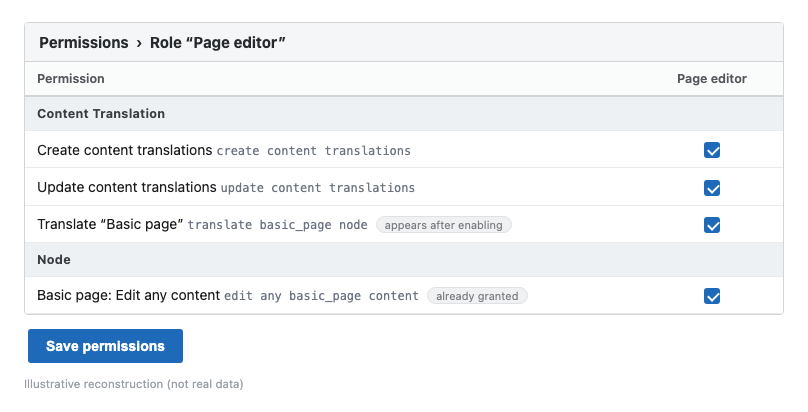
On the role's permissions page, I checked the following three and saved:
- Create content translations (
create content translations) - Update content translations (
update content translations) - Translate the target content type (
translate <type> node, the row that appears after enabling)
After saving, I had the editor log out and back in (clearing the cache if needed), and confirmed that the Translate tab and "Add" now appeared.
Why this is all admin-UI clicking
All of this work was done in the Drupal admin UI. It is natural to ask whether it could be configured in bulk via an API, but this follows from Drupal's design.
Drupal's JSON:API can read and write "content entities" such as nodes and users, but "configuration entities" such as content types, roles, permissions, and translation settings are read-only. If you want to automate configuration, the admin UI or Drush over SSH are the realistic options. Operations like "enable translation and grant permissions to a role" are changes on the configuration-entity side, so doing them through the admin UI is the straightforward path.
| Kind | Examples | JSON:API operations |
|---|---|---|
| Content entity | Node, user | Read/write |
| Configuration entity | Content type, role, permission, translation settings | Read-only |
Summary
Behind the single symptom of "the English version can't be edited," independent conditions were stacked:
- Translation was not enabled for the target content type → enabled it in the Content language settings (this alone made the administrator able to edit)
- The editor's role lacked the translation permissions (the two layers of action + target) → granted them so the editor can edit too
The parts most easily overlooked were that being able to edit and being able to translate are separate permissions, and that translation permissions are split into "action" and "target" layers. Checking "does it show for administrators?" first lets you isolate whether the problem is content-type enablement or a role permission.
Comments
…