This article was co-authored with generative AI. Facts have been checked against public documentation where feasible, but errors may remain. Please verify primary sources before relying on this for important decisions.
While running a IIIF (International Image Interoperability Framework) image viewer, I ran into a symptom where the page-thumbnail rail failed to render for certain collections. With the same viewer, images we host ourselves were fine; only collections that reference an external IIIF Image API had broken thumbnails — a symptom that was hard to isolate.
As far as I could tell, the cause was how the thumbnail URL builds its size parameter. It used full/!w,h/ (the form with a leading !, sizeByConfinedWh), which is not a guaranteed feature on a IIIF Image API compliance level 1 server. I didn't find this laid out very explicitly, so I'm recording it here together with the measurements.
The shape of the thumbnail URL
The viewer generated page thumbnails in roughly this form. The intent is to fit the image into a box that is 240 wide, with the height capped at twice that.
{IIIF Image API service base}/full/!240,480/0/default.jpg
In the size segment !240,480, the leading ! means "scale down to fit within a 240×480 box while preserving the aspect ratio." In IIIF Image API terms this is the feature called sizeByConfinedWh.
For images served by our own tile server (Cantaloupe), this URL returned thumbnails fine. But for collections referencing the IIIF Image API of the National Diet Library Digital Collections (hereafter NDL), the same URL shape did not render a thumbnail.
Reading info.json
A IIIF Image API server declares the features it supports in each image's info.json. Checking an NDL image, it looked like this (excerpt):
{
  "@context": "http://iiif.io/api/image/2/context.json",
  "protocol": "http://iiif.io/api/image",
  "width": 5169,
  "height": 3461,
  "profile": [
    "http://iiif.io/api/image/2/level1.json",
    { "formats": ["jpg"], "qualities": ["default"],
      "supports": ["regionByPct", "sizeByWh"] }
  ]
}
How to read it:
- The first string in
profile,.../level1.json, is the compliance level. Here it is level 1. - The
supportsarray in the second object ofprofilelists features supported in addition to that level's required features. Here it declares extra support forregionByPctandsizeByWh.
So this server declares that it supports "the required features of level 1 + sizeByWh + regionByPct." sizeByConfinedWh (!w,h) is not in that list.
Testing it directly
To check whether the info.json declaration matches actual behavior, I requested several size parameters and looked at the HTTP status.
base="https://www.dl.ndl.go.jp/api/iiif/1645378/R0007"
for sz in "!240,480" "240,480" "240," ",480" "pct:25"; do
  code=$(curl -s -o /dev/null -w "%{http_code}" "$base/full/$sz/0/default.jpg")
  echo "$sz -> $code"
done
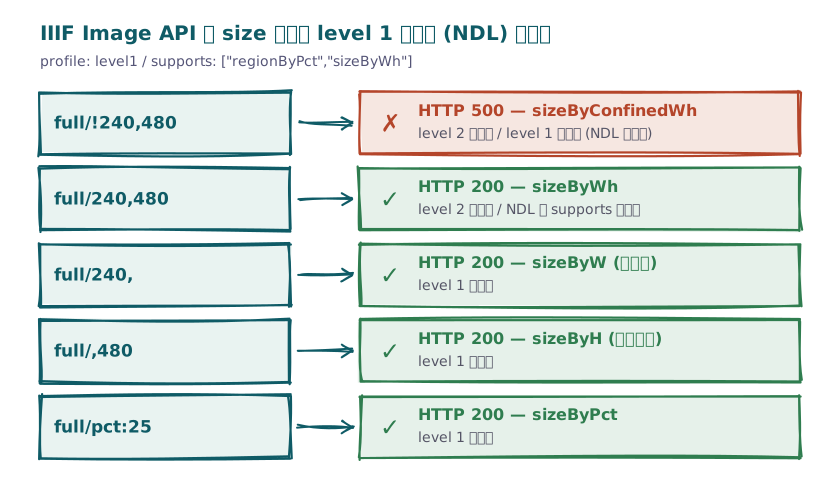
The results:
| Size parameter | IIIF name | Meaning | Response |
|---|---|---|---|
!240,480 | sizeByConfinedWh | Fit within the box (ratio preserved) | 500 |
240,480 | sizeByWh | Set width and height (ratio not preserved) | 200 |
240, | sizeByW | Width only (ratio preserved) | 200 |
,480 | sizeByH | Height only (ratio preserved) | 200 |
pct:25 | sizeByPct | Percentage | 200 |
Exactly as info.json declares, only !240,480 (sizeByConfinedWh) fails. The status was 500 (a 500 rather than a 400 seems to be a quirk of the server's implementation, but either way you don't get an image). In the browser, this showed up as only the thumbnails — where this URL was the img src — appearing broken.
How compliance levels map to size parameters
The IIIF Image API defines compliance levels (level 0 / 1 / 2), and which size parameters a server is obligated to support is fixed per level. Checking the IIIF Image API 2.1 compliance document, the size parameters map as follows.
sizeByW(w,),sizeByH(,h), andsizeByPct(pct:n) are required at level 1. Any server at level 1 or above supports them.sizeByWh(w,h) andsizeByConfinedWh(!w,h) are required at level 2. At level 1 they are optional, and whether they work is up to the server. When supported, they are listed insupports.
Note that level 0 returns only full (the original size) and has no downscaling parameter, so producing a scaled-down thumbnail already assumes level 1 or above. Also, this article targets Image API 2.x. As far as I checked, the compliance table changes somewhat in 3.0 — for example sizeByPct becomes optional at level 1 — so if you are dealing with a 3.x server it's worth checking again.
NDL's server is level 1, and while it lists sizeByWh in supports, it does not list sizeByConfinedWh. So !w,h is out of scope, which is the whole story here. The important point is that this is not specific to NDL: for any level 1 server it is entirely permissible, per the spec, not to support !w,h. When you reference an external IIIF Image API that you don't host, there's a real chance of hitting a level 1 server.
Incidentally, w,h (sizeByWh) means "return exactly this width and height," so if the requested aspect ratio doesn't match the source image (or the extracted region), the image is distorted. When you want a thumbnail to fit neatly into a box, it's tempting to reach for !w,h, which preserves the ratio — and that !w,h was exactly the trap this time.
Switching to width-only sizing (sizeByW)
As the fix, I changed the thumbnail size parameter from !w,h (sizeByConfinedWh) to width-only w, (sizeByW).
{service base}/full/240,/0/default.jpg
sizeByW is required at level 1, so it works on any server at level 1 or above, and it preserves the aspect ratio. The difference is that the height cap no longer applies on the URL side; but since the thumbnail's display box is already controlled with CSS (a width constraint like w-full, plus max-height if needed), the visual result was effectively unchanged. That said, there's a payload angle beyond display: because w, doesn't bound the height, an extremely tall image (a handscroll, say) will come back larger than expected. For those, you can instead use height-only ,h (sizeByH, also required at level 1) — but ,h in turn doesn't bound the width, so extremely wide images hit the same issue. In practice you pick width or height to match the aspect ratio of the material you're dealing with; either way, specifying just one dimension gives you the broadest range of compatible servers.
Where we reference our own tile server (Cantaloupe is level 2), !w,h worked without issue, but the places that can reference external services — the thumbnail in a manifest, the page rail, the similar-images panel, and so on — were all moved to w,. When you proxy or federate an external IIIF Image API into your own viewer, you can't control the compliance level of the target, so I've come to feel it's safest to build thumbnail size parameters using only level 1's required features.
Summary
The takeaways from this bit of debugging:
- When you build a URL that "fetches at a reduced size" (thumbnails and the like), check the target's
info.jsonprofile(level) andsupports. !w,h(sizeByConfinedWh) andw,h(sizeByWh) are required at level 2 and optional at level 1. A level 1 server may not support them.- To maximize the range of compatible servers, use width-only
w,(sizeByW) or height-only,h(sizeByH). These are required at level 1. - If you want to constrain both dimensions to a box, don't force the reduction in the URL; control the frame with CSS on the display side.
As long as you only handle images you host yourself, you can use !w,h on a level 2 assumption and never notice. The moment you mix in an external IIIF Image API, the level difference surfaces. IIIF interoperability rests on the fairly obvious idea of "choosing parameters that work on any server at level 1 or above" — something a single thumbnail reminded me of.


Comments
…