This article was co-authored and co-produced with generative AI (Claude Code). Facts have been checked where feasible, but errors may remain. Please verify primary sources yourself before making important decisions.
I am making a personal video series that explains each technical element of the digital humanities (TEI, RDF, …) one element per video. Narration is laid over each slide, one at a time, and read aloud by a clone of my own voice — 15–20 minute technical explainer videos. This article gathers the practical know-how I gained producing them — Marp hand-drawn-style slides, a homemade tool for recording the voice-clone training material, and the pitfalls of actually running ElevenLabs' Professional Voice Clone (PVC) × v3 in production — using the "Intro to RDF" episode as an example.
Quality comparisons of voice cloning itself, and automatically generating videos from blog articles, are covered in existing articles. Taking those as given, this article focuses on the process of finishing a "slide-format technical explainer video."
- Comparing Japanese narration quality of ElevenLabs v2 and v3
- Comparing reading-correction approaches in a VOICEVOX video pipeline
- Automatically generating explainer videos from 882 blog articles with Claude Code's parallel agents
What I made
One episode of the technical-element series: "Intro to RDF and Linked Data." With a common format (main title + subtitle, hand-drawn-style theme), 1920×1080, 15–20 minutes.

Slides are made in Marp and exported to PNG. The narration script is held as sections.json (slide number → list of narration sentences), synthesized with ElevenLabs, and afterwards batch-muxed with ffmpeg into "silent slide video + full audio" to sync them.
Marp(.md) ──→ page-NN.png(1920×1080)
sections.json(slide:N, narration:"…")
        │
        ▼  ElevenLabs PVC × v3(with-timestamps)
   chunk audio + character-level timestamps
        │  split at the boundary "the start of speaking the first character of the next slide" using timestamps
        ▼
   concatenate silent slide video + batch-mux the full audio ──→ video_main.mp4
How the "hand-drawn-style figures" on the slides are made
The figures on the slides (little sketches) are made in a warm, hand-drawn style. The key point is that Marp is static and does not execute JavaScript. So the figures are baked into SVG ahead of time with roughjs and then embedded into the slides.
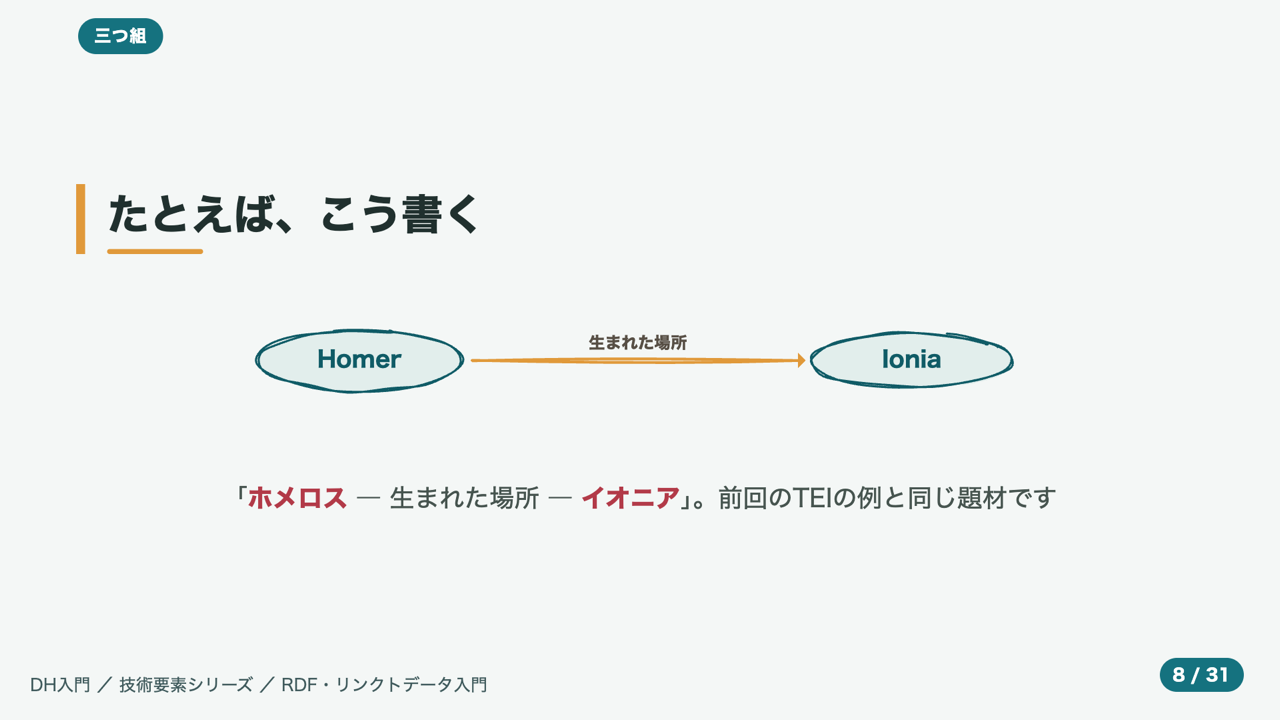
A script called gen.mjs uses roughjs's generator to generate shapes (rectangles, ellipses, lines, arrows), converts them to SVG <path> with gen.toPaths(), and saves them to figures/*.svg. Run node gen.mjs to generate them all at once, and the slide simply loads them with <img src="figures/triple.svg">. The hand-drawn "wobble" comes from the roughness and bowing parameters.
import rough from 'roughjs';
const gen = rough.generator();

// roughjs shapes → convert to SVG path strings
const toP = (d) => gen.toPaths(d).map(p =>
  `<path d="${p.d}" fill="${p.fill||'none'}" stroke="${p.stroke||'none'}"
    stroke-width="${p.strokeWidth||0}" stroke-linecap="round"/>`).join('');

// The core of the hand-drawn feel: roughness (line roughness) and bowing (curvature)
const o = (x={}) => ({ roughness: 1.7, bowing: 1.4, stroke: '#0f5b66', strokeWidth: 2.4, ...x });
const ellipse = (cx, cy, w, h, x2) => toP(gen.ellipse(cx, cy, w, h, o(x2)));

// Componentize nodes (ellipse + centered label) and so on
const node = (cx, cy, w, label) =>
  ellipse(cx, cy, w, 66, { fill:'#e2eeec', fillStyle:'solid' }) +
  `<text x="${cx}" y="${cy+8}" text-anchor="middle" ...>${label}</text>`;

// Put the "subject —predicate→ object" triple on one slide
let b = node(140,100,220,'主語') + node(460,100,220,'述語') + node(780,100,220,'目的語');
b += arrowH(255,345,100) + arrowH(575,665,100);
writeFileSync('figures/triple.svg', `<svg ...>${b}</svg>`);
I have also decided on design rules (production guideline §4).
- One figure = one relationship (one of: flow / contrast / nesting / graph).
- Do not rely on color alone (for color-vision diversity, distinguish with brightness difference + shape + direct labels).
- For rows that line up words horizontally, use a helper (
richLine) that flows them onto one line with<tspan>, placing coordinates by hand to prevent collision with the neighboring word. - Always attach alternative text (alt) to figures, and additionally verbalize the figure's key points in the narration too (so it is understandable from audio alone).
- Do not trace figures from the source. Reference only the concept and draw anew (out of license consideration).
The common use of roughjs is to "draw to a canvas at runtime," but here the trick is to use
generatorto extract only the path strings and bake them into static SVG. The same figure reproduces in Marp, PDF, or video, and the build is faster too.
Tool ①: a "recording teleprompter" for clone training
A PVC is made by training on samples of your own voice. To record clean samples stably, I built a teleprompter where characters get painted red in time with the reading speed (the figure below shows it with a sample sentence loaded).
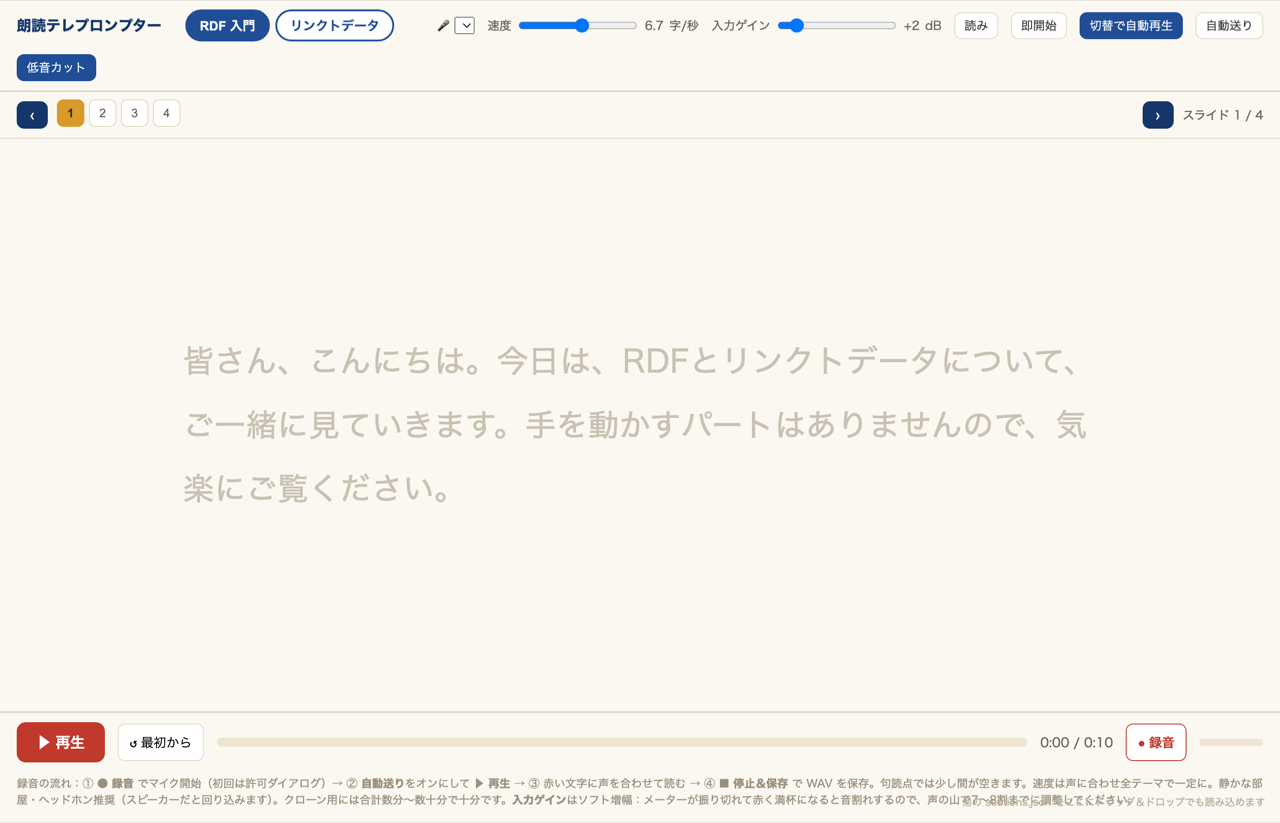
- Karaoke-style red progression: characters are painted at a target speed (chars/sec), so you can read at a steady tempo. Weighted to pause slightly at punctuation.
- Auto-play on slide switch: without inserting a countdown, you can start reading immediately after advancing (the tempo of re-takes goes up).
- Save raw (unprocessed) WAV in the browser: for clone training, raw audio without noise suppression or auto-gain is preferable, so record with
echoCancellation / noiseSuppression / autoGainControlall set tofalse. - Input gain, low-cut, mic selection: assuming a USB condenser mic, provide an HPF that cuts low frequencies like air conditioning, and an input gain for level adjustment.
App-side noise suppression is for shaping "the voice that reaches the other party." For training use, use raw audio — the point is to use them appropriately for their purpose. I adjusted recording level and noise floor by looking at the peak level / RMS / noise floor numbers from
ffmpeg'sastats(useshowwavesand the like when you want to see the waveform itself).
The knack of PVC × v3
v2 or v3, PVC or IVC
For Japanese naturalness, v3 is clearly superior (v2 tends to retain an English accent). On the other hand, v3 has quirks in production use.
- Adjusting with
speeddoes not take effect (my own hands-on observation).speed(0.7–1.2) is officially said to be usable across all models, but within the range where I ran PVC × v3 in production (as of 2026-06), I did not get the expected speed change. Rather than relying on the parameter, shape the tempo on the script side (described later). - A long single generation collapses or repeats toward the end (a rule of thumb from hands-on use). For me it became unstable roughly from 2,000–3,000 characters onward. The official per-request limit is about 5,000 characters, so to be safe I split into smaller chunks.
- PVC (Professional Voice Clone) can be fine-tuned to multiple models, and using a trained PVC for v3's with-timestamps synthesis was also possible in practice (2026-06; timestamps are returned too). This lets you achieve both slide sync and natural Japanese. However, the official guidance warns that "PVC is not yet fully optimized for v3, and clone quality may drop," so if you prioritize quality, IVC or a designed voice are also worth considering for v3.
Note (my own hands-on observation): while a PVC is being re-fine-tuned (re-fine-tune), the API temporarily returned
voice_not_fine_tunedand became unusable. Once it completed, it passed with 200 again even on v3.
Adjust tempo by "thinning out commas"
Since adjusting with speed does not take effect, adjust v3's tempo by the amount of commas (、) in the script. In fact, one particular script sounded oddly slow and halting, and when I looked into it, only that script had a conspicuously high number of commas (in my own measurement, 4.7 per sentence, versus 1.6–2.4 for the others). Because v3 inserts a small pause at each comma, having 2–3 times as many commas makes it much slower even at the same character count. Just thinning out the excess commas evened out the tempo and shortened the runtime.
Mask the "timbre seams" with a lingering pause
Since v3 supports neither request stitching nor previous/next text, if you split the script into multiple chunks and synthesize, each chunk becomes a completely independent, separate generation. As a result, the tone and tempo change slightly at chunk boundaries — a "timbre seam" appears (with 1,300-character chunks, 5,000 characters gives about 4 chunks = roughly 3 seams). When a slide advance overlaps this seam, a visual cut + timbre change arrive at the same time, which makes it stand out even more.
The seam itself cannot be erased, but using the property that a chunk boundary always coincides with a slide boundary, I masked it by inserting a short silence (a lingering pause) there. I added --chunk-gap to the synthesis script, inserting 0.9 seconds of silence at the seam. The video side also adds the same number of seconds to the last slide of each chunk, so A/V sync is preserved.
python3 build_slideshow_narration.py <lecture_dir>/ \
  --single-call --max-chunk-chars 1300 \
  --stability 0.6 --chunk-gap 0.9 \
  --voice-id <PVC_VOICE_ID> --model eleven_v3
I set the number of seconds in contrast to the natural pause ≈ 0.5–0.8 seconds that occurs at a normal slide switch (within a chunk) (the interval v3 creates at a sentence-ending "。"; measured with my own script, voice, and settings). Since a seam is a break between clusters of slides, 0.9 seconds — slightly longer than a natural pause — sounds natural as "the breath of a section break" (beyond 1.2 seconds it drags). Raising --stability to 0.6–0.7 alongside also reduces the tone variation between chunks itself (intonation decreases slightly).
For minor tweaks of just the lingering pause, adding --skip-audio lets you rebuild only the video without re-synthesizing (without using credits).
Tool ②: "seam_review" to check seams pinpoint
To evaluate tightening the seam's lingering pause from, say, 0.6 → 0.9 seconds, you need to cue up and listen to that spot each time. So I built a tool that generates HTML to cue-and-play the boundary with one click. It recomputes the boundary timestamps from _slide_specs.json (each slide's duration saved at synthesis time) and outputs a review page with the video embedded.
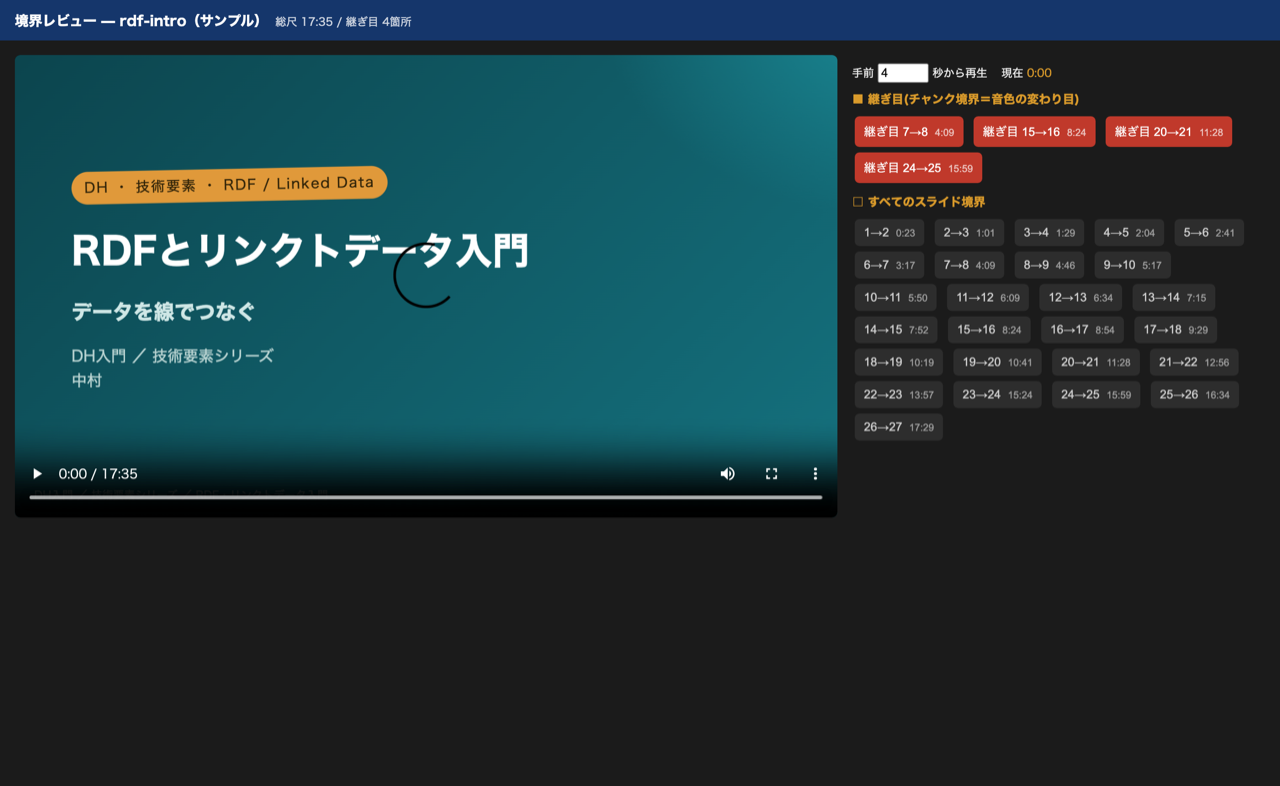
- Red button = a seam (a timbre change point). Clicking auto-plays from a few seconds before.
- The gray buttons below = all slide boundaries. You can check any switch point too.
python3 seam_review.py <lecture_dir>/ --chunk-gap 0.9
Detecting and correcting misreadings
Synthesized speech misreads proper nouns and hard-to-read words. This pipeline has a reading dictionary (reading_overrides.csv = an Excel reading-correction list) and an application script (apply_readings.py), which applies the dictionary to sections.src.json (the kanji canonical text) to generate sections.json (the synthesis input). Lessons learned this time:
- Do not write "kanji + kana" reading side by side. If the script writes something like "悉皆、しっかい、", v3 reads the kanji (and misreads it, at that) and also reads the kana = a double reading. Use kana only.
- Even if VOICEVOX reads it correctly, v3 may misread it. In fact, "悉皆" was read correctly as "シッカイ" by VOICEVOX, but v3 read it as "しこぎな". In other words, an automated check (VOICEVOX's kana expansion) cannot fully predict v3's misreadings. Narrow down candidates for hard-to-read words with a machine check, but ultimately confirm by ear to be sure.
- For proper nouns whose pronunciation is unstable and bothersome, such as your own name in a self-introduction, one option is to just rewrite them into an easy-to-read spelling.
The comparison of reading-correction approaches is detailed in this article.
Proofreading series-wide duplication like a "regression test"
A multi-episode series (Intro to TEI, Intro to RDF, …), if left alone, tends to make you feel "here's that same story again" when watched through. So I adopted the following operation:
- Decide one "primary episode" for each concept, and have the other episodes only touch on it lightly (MECE).
- Audit the scripts for duplication from different viewpoints (concept / concrete example / through-listening) with multiple agents, and reflect the findings.
- Re-run the same audit after reflecting them (a regression check like a programming test). Repeat "fix → re-audit" until it passes.
What was important here was the realization that the policy of "wanting each video to be self-contained and independent (not wanting to add cross-references)" and "zero duplication" cannot be achieved at the same time. No matter how many times you run the audit, it keeps recommending "add a connective like 'last time we did ~, this time ~' to turn it into continuity," but that clashes with the independence policy. It required the judgment to accept that conceptual duplication is to some extent unavoidable, arising from a shared subject, and to stop the audit loop once the obvious internal redundancy (like the same phrasing three times in a row) had been squashed.
The thinking behind review by parallel agents is an extension of this article.
Make the guideline the SSOT
Rather than leaving these judgments as one-offs, I appended each one to the production guideline (Single Source of Truth) as it came up. Insights like "0.9 seconds of lingering pause at a seam," "avoid writing readings side by side because it causes double reading," and "adjust v3's tempo with commas" — the ones you cannot know until you get burned — are precisely the ones that pay off in the next episode once documented.
Summary
- A slide-format technical explainer video can be assembled with Marp → sections.json → ElevenLabs PVC×v3 → ffmpeg batch mux.
- Figures are baked into static SVG with roughjs and embedded (because Marp does not execute JS). The hand-drawn feel comes from
roughness/bowing. - v3 is natural but has quirks:
speeddoes not take effect / long generations collapse / chunks are generated independently, so seams appear. - Adjust tempo by the amount of commas, and mask seams with a 0.9-second lingering pause at the boundary. With
--skip-audioyou can tighten it without spending credits. - For misreadings, narrow candidates with a machine check but ultimately use your ears. Writing "kanji + kana" side by side causes double reading.
- Proofread the series with MECE + multi-agent regression review. But since independence and zero duplication cannot coexist, decide where to stop.
- Append the insights you gain to the guideline (SSOT) to make use of them next time.

Comments
…