This article was co-authored with generative AI. Facts have been checked against public documentation where feasible, but errors may remain. Please verify primary sources before relying on this for important decisions.
Overview
I build searchable PDFs by overlaying the results of OCR (optical character recognition) onto scanned images as an "invisible text layer." On a certain vertically written document, I noticed the invisible text was misaligned from the actual character positions. Range selection and highlighting did not land on the characters, and the reading order of extracted text was scrambled.
On investigation, the cause was that the script embedding the invisible text did not account for the source PDF's page rotation (/Rotate). Rather than being a problem with vertical writing itself, it was a coordinate-system confusion that only surfaced on PDFs whose pages carried /Rotate 270.
This article covers the following, in order:
- A verification method that mechanically isolates which files are affected
- Identifying the root cause (a double rotation of the coordinate system) through a controlled experiment
- How to fix only the invisible text layer without re-running OCR
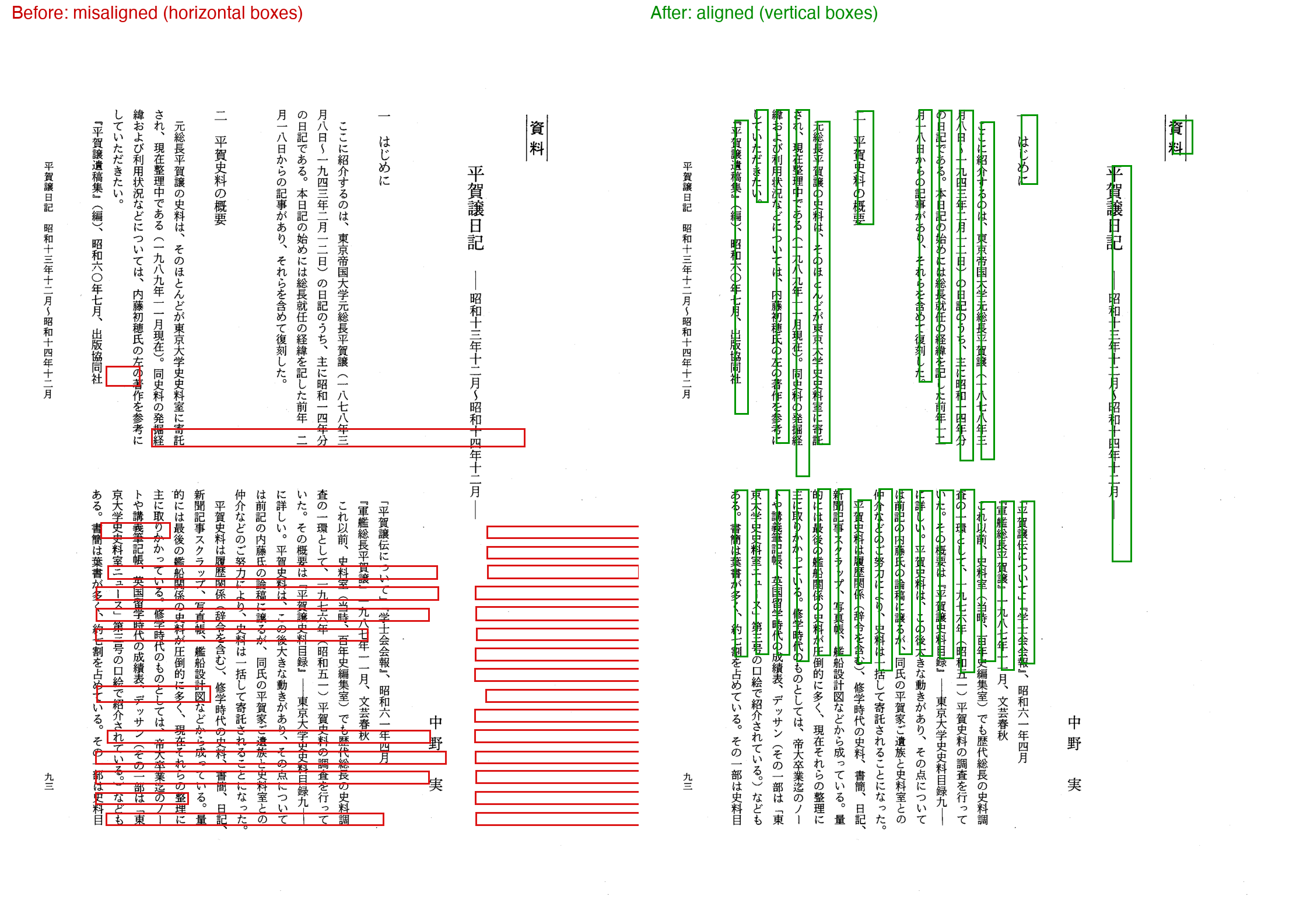
Below is a before/after comparison. The red/green frames show the positions of the invisible text lines. On the left (Before), horizontal bands cut across the vertical columns, and frames even float into the blank space of the right margin. On the right (After), vertical boxes sit on each vertical column.
The Pipeline Assumed Here
The searchable PDFs were built roughly in the following three stages.
render.py… renders the source PDF to a 300dpi image with PyMuPDF'sget_pixmap()ndlocr-lite… OCRs the image and outputs the string and bounding box for each lineoverlay.py(ormake_searchable.py) … writes the OCR coordinates back onto the source PDF as invisible text (render_mode=3)
The part that embeds the invisible text judged vertical vs. horizontal writing from the aspect ratio of each line's bounding box.
# overlay.py (excerpt, simplified): write line boxes back onto the source PDF
sx, sy = page.rect.width / img_w, page.rect.height / img_h
x = float(line.get("X")) * sx
y = float(line.get("Y")) * sy
w = float(line.get("WIDTH")) * sx
h = float(line.get("HEIGHT")) * sy
vertical = h > w * 1.5
if vertical:                       # vertical line: top to bottom
    point = fitz.Point(x + w * 0.8, y)
    rot = 270
else:                              # horizontal line
    point = fitz.Point(x, y + h * 0.8)
    rot = 0
page.insert_text(point, text, fontname="japan", fontsize=fs,
                 render_mode=3, rotate=rot)
The vertical/horizontal branch itself was present, and it worked correctly on other vertically written documents. The starting point was that misalignment appeared only on some documents nonetheless.
Verification Method
1. Confirm the phenomenon (fonts / images / text)
First, check the nature of the target PDF. poppler's CLI is convenient.
pdffonts  file.pdf     # embedded fonts / encodings
pdfimages -list file.pdf  # presence/resolution of in-page images (scan layer)
pdftotext -bbox file.pdf - # extraction with per-word bounding boxes
In the target diary PDF, each page contained a single 300dpi CCITT (bitonal) scanned image, with invisible text laid on top. Extracting the body text with pdftotext (layout not preserved) here produced the left-column body and the right-column notes alternating line by line, scrambling the reading order.
2. Visualize the position of the invisible text
Since numbers alone are hard to interpret, draw the bounding boxes of the invisible text lines over the scanned image. The important thing here is to draw in display coordinates (coordinates with page rotation applied). The bounding boxes returned by PyMuPDF's page.get_text("dict") are values in "native space" without page rotation applied, so you multiply by page.rotation_matrix to convert to display space before drawing.
import fitz
from PIL import Image, ImageDraw

d = fitz.open(path); p = d[0]
m = p.rotation_matrix            # native -> display
pix = p.get_pixmap(dpi=150)      # render in display orientation (upright)
img = Image.frombytes("RGB", [pix.width, pix.height], pix.samples)
dr = ImageDraw.Draw(img); sc = 150 / 72
for b in p.get_text("dict")["blocks"]:
    for l in b.get("lines", []):
        r = fitz.Rect(l["bbox"]) * m           # convert to display space
        dr.rectangle([r.x0*sc, r.y0*sc, r.x1*sc, r.y1*sc], outline=(220,20,20), width=3)
img.save("overlay.png")
This overlay clearly showed the invisible text lines cutting across the vertical columns as horizontal bands, with some floating into the margin (the Before image at the top).
3. Mechanically isolate the scope of impact
Check whether other files in the same folder have similar corruption. Working from the idea that "a vertically written document whose invisible text lines are dominated by horizontal boxes" is suspect, I bulk-measured each PDF's page rotation, MediaBox orientation, and vertical-box ratio.
# For each PDF, measure the "vertical-box ratio" from line-box aspect ratios (sample page)
for b in page.get_text("dict")["blocks"]:
    for l in b.get("lines", []):
        x0, y0, x1, y1 = l["bbox"]
        w, h = x1 - x0, y1 - y0
        if h > w * 1.3: vert += 1
        elif w > h * 1.3: hor += 1
However, this ratio alone leads to misjudgment, for two reasons.
- Horizontally written documents (e.g., technical books) are dominated by horizontal boxes even when processed correctly
- On rotated pages (
/Rotate 270), native-space boxes look vertically long (h > w), but appear as horizontal bands when displayed
So I used the ratio to narrow down candidates, then visually confirmed suspicious ones against controls (normal ones) one by one using overlays in display space. As a result, I isolated the following:
- Even when horizontal boxes dominated, horizontally written documents were normal, with frames correctly on the horizontal rows
- Vertically written documents were normal, with vertical boxes correctly on the vertical columns
- Only the files with
/Rotate 270+ landscape MediaBox had the corruption where horizontal bands cut across vertical columns
Only 2 files (2 volumes of the same document) in the target folder were corrupted, and both had /Rotate 270.
Root Cause: A Double Rotation of the Coordinate System
The characteristic common to the corrupted files was /Rotate 270 (+ landscape MediaBox). From here I narrowed down the cause.
In PyMuPDF, when a page has rotation, two coordinate systems disagree.
page.rect… the display space with rotation applied. A landscape page with/Rotate 270becomes portrait on display- The coordinates of
page.insert_text()… the native (unrotated) space with rotation not applied. This remains landscape
Tracing the pipeline's flow:
render.py'sget_pixmap()applies rotation and emits an upright (portrait) image. OCR looks at this upright image and returns line boxes in upright portrait pixel coordinatesoverlay.pyscales bypage.rect.width / img_w. Sincepage.rectis display (portrait) space, the resulting coordinates are display-space values- However,
page.insert_text()writes them as native (landscape) space coordinates - And then
/Rotate 270is applied on display
As a result, the vertical-column coordinates correctly computed in display space are placed in native space and then rotated twice, turning into "displaced horizontal bands."
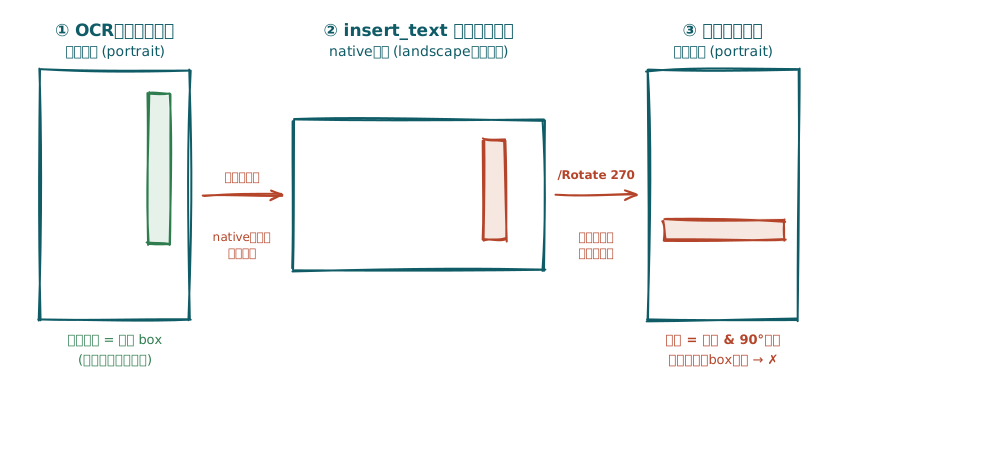
If the source PDF's /Rotate is 0, native and display space coincide, so this confusion does not surface. That is why the other documents were normal, and the only corruption occurred in the 2 volumes whose scans were stored in landscape + /Rotate 270.
Reproduce with a Controlled Experiment
To confirm the hypothesis, I created an empty page with /Rotate 270, wrote "vertical-column coordinates computed in display space" following the same procedure as the pipeline, and measured where they actually landed.
import fitz
doc = fitz.open(); page = doc.new_page(width=729.6, height=516)  # landscape native
page.set_rotation(270)                                           # display is portrait
# render.py equivalent: get_pixmap applies rotation -> portrait image (2150x3040) is emitted
pix = page.get_pixmap(matrix=fitz.Matrix(300/72, 300/72))
# overlay.py equivalent: coordinates of the vertical column computed in display space
# (page.rect=portrait) are passed as-is to insert_text in native space
page.insert_text(fitz.Point(466.5, 58.4), "平賀譲日記",
                 fontname="japan", fontsize=14, rotate=270)
The result was as follows, precisely reproducing the phenomenon.
Intent (display portrait space): point (466, 58) = top right, vertical downward
Actual native bbox             : [463, 58, 485, 188]  (vertically long box)
Actual display bbox            : [58, 245, 188, 267]  (= left, middle-row horizontal band)
The "top-right vertical column" turns into a "left, middle-row horizontal band." This matched the phenomenon seen in the actual file.
Was It a Problem with the Script?
Yes. overlay.py / make_searchable.py had the following two latent bugs.
- Not handling page rotation (the main cause) … coordinates were computed relative to
page.rect(display space) but passed as-is topage.insert_text(native space). Because this doesn't manifest on documents with/Rotate0, it went unnoticed until a rotated PDF was fed in. - Line-origin drift (described later) … the insertion point for vertical lines used
x + w * 0.8, so characters were shifted roughly one column to the right. #1 is immediately visible on display, but #2 could not be noticed until overlaying at the character level.
The vertical/horizontal detection logic itself was correct; rather than vertical writing being the cause, the causes were "a missing coordinate transform for rotated pages" and "an offset in the line origin."
The Fix: Repair Only the Invisible Text Layer Without Re-OCR
Re-OCR was unnecessary. The reason is that the corrupted PDF retains the correct OCR strings, and each line's native bbox numerically coincides with the display-space box it was originally intended to have (the flip side of the bug). In fact, reading each line's native bbox from the corrupted file, the title "平賀譲日記" is [383, 115, 398, 423], and reading this as portrait (516×729.6) coordinates matches the position of the title in the actual image (the right-leaning vertical column at the top).
So I fixed it with the following procedure.
- Delete the existing (misplaced) invisible text and keep the scanned image
- Re-insert each line into its "target box in display space," canceling the rotation
- Transform the insertion point to native space with
page.derotation_matrix - Set
insert_text'srotateto "visual orientation +page.rotation" (for vertical downward270+/Rotate 270,540 % 360 = 180)
- Transform the insertion point to native space with
For the rotate value that cancels the rotation, I brute-forced candidates on the /Rotate 270 page and picked the one that made vertical-downward text appear at the target display position (rotate=180).
import fitz

FONT = fitz.Font("japan")

def place_line(page, D, t, R, derot):
    """Place one line into line box D (display space), canceling the rotation."""
    w, h = D.width, D.height
    unit = FONT.text_length(t, fontsize=1)
    if unit <= 0:
        return
    if h > w:  # vertical (top to bottom on display)
        fs = min(h / unit, w * 1.05)         # fit the total advance to column length h
        disp_pt = fitz.Point(D.x0, D.y0)     # top-left of the column (do not add +w*0.8 to x)
        vis_rot = 270
    else:      # horizontal
        fs = min(w / unit, h * 1.05)
        disp_pt = fitz.Point(D.x0, D.y0 + h * 0.8)
        vis_rot = 0
    page.insert_text(disp_pt * derot, t, fontname="japan", fontsize=fs,
                     render_mode=3, rotate=(vis_rot + R) % 360)

def fix(inp, outp):
    doc = fitz.open(inp)
    for page in doc:
        R = page.rotation
        if R == 0:
            continue                     # no rotation was already correct, so leave it
        derot = page.derotation_matrix
        # collect each line in native space (= the originally intended display-space box)
        lines = []
        for b in page.get_text("dict")["blocks"]:
            for l in b.get("lines", []):
                t = "".join(s["text"] for s in l["spans"]).strip()
                if t:
                    lines.append((fitz.Rect(l["bbox"]), t))
        # delete only the existing invisible text (keep images and line art)
        page.add_redact_annot(page.rect, fill=None)
        page.apply_redactions(images=fitz.PDF_REDACT_IMAGE_NONE,
                              graphics=fitz.PDF_REDACT_LINE_ART_NONE)
        for D, t in lines:
            place_line(page, D, t, R, derot)
    # clean=True consolidates and compresses the content stream
    doc.save(outp, garbage=4, deflate=True, clean=True)
Because this method does not re-rasterize the scanned image, image quality stays as in the original, and the file size stayed at or below the original, from 979,030 bytes to 788,278 bytes. To delete the existing text I used apply_redactions, setting images / graphics to ..._NONE to preserve images and line art (and fill=None so no red fill is drawn either).
Note that there is also a method of rebuilding into an upright (/Rotate 0) page by reusing only the images from the existing PDF. It requires no rotation math and is simpler, but because get_pixmap re-rasterizes the image, bitonal scans become RGB and the file size grows several-fold (about 3.2x measured). If you want to preserve image quality and size, the "replace only the invisible text while keeping the original page" method above is the better fit.
Verifying at the Character Level Revealed Another Misalignment
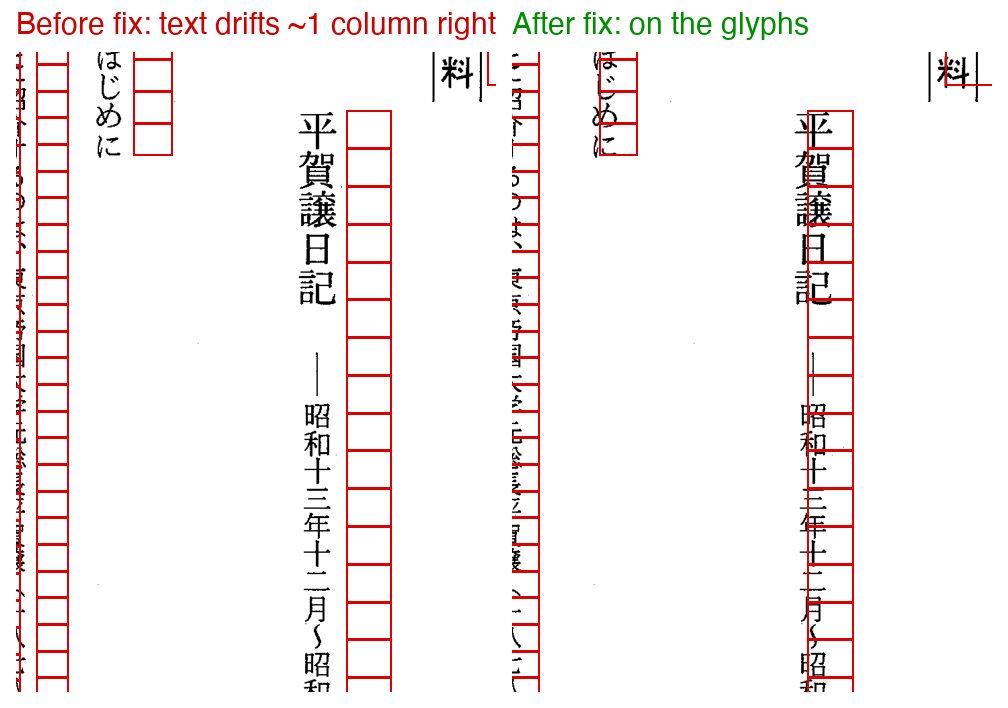
At the stage of overlaying line boxes, the frames were on the vertical columns and it looked fixed. But just to be safe, overlaying the per-character bounding boxes (each char's bbox from get_text("rawdict")) onto the scan revealed that the invisible characters were shifted roughly one column to the right of the actual black characters.
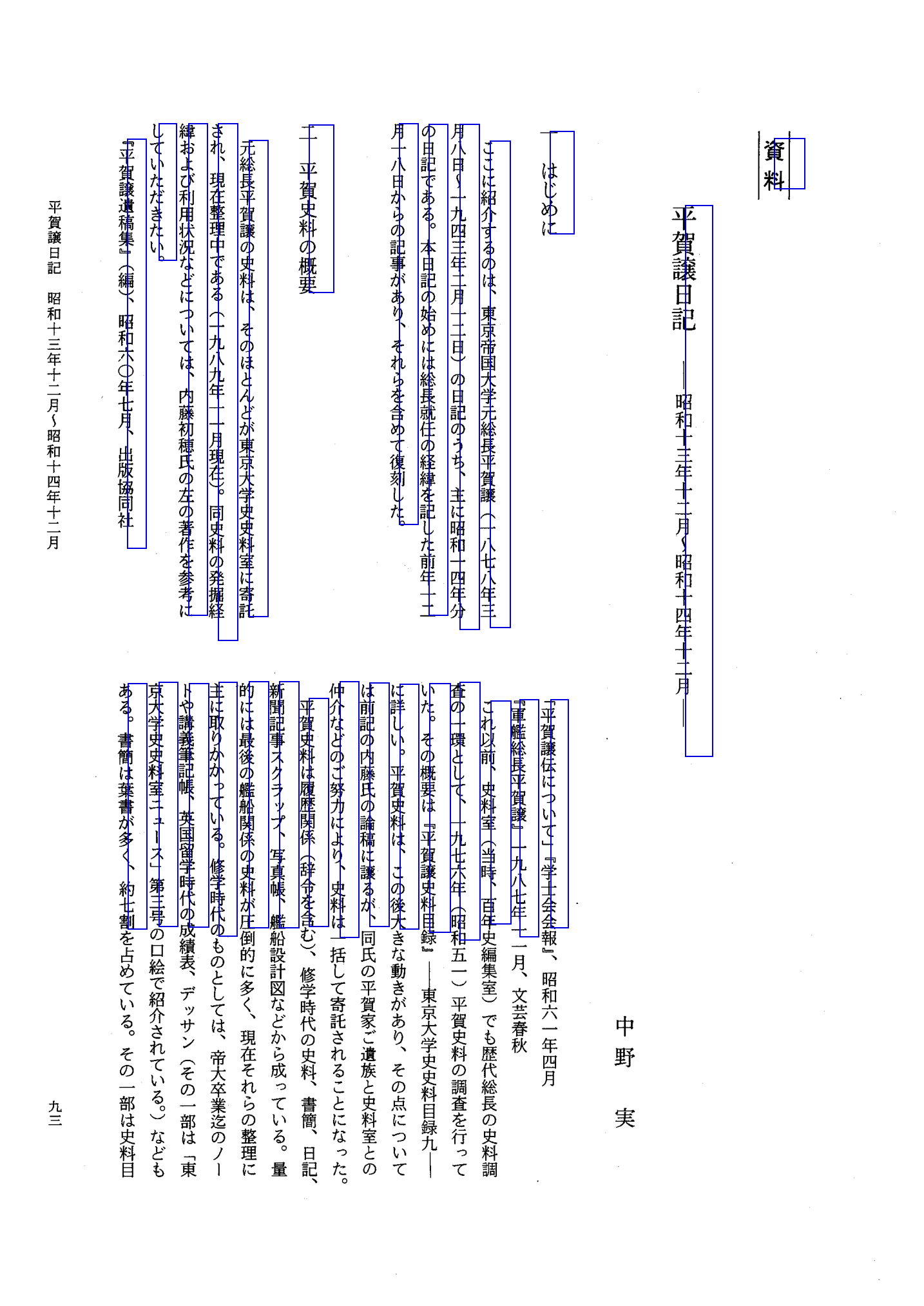
To isolate the cause, I first overlaid the target boxes D themselves (the OCR coordinates) onto the scan, and they sat exactly on each column (figure below). In other words, the OCR coordinates were correct, and the drift was a problem with "the origin used when placing the characters inside D."
The culprit was the x + w * 0.8 (shifting 80% of the column width to the right) used as the insertion point for vertical lines. Calibrating by measuring candidate positions on the /Rotate 270 page, the correct insertion point was the left edge of the column, x = D.x0; removing the w * 0.8 made the characters nearly coincide with the black characters (error around 2pt). The disp_pt = fitz.Point(D.x0, D.y0) in the code above is this fix.
Why Insert Per Line (Not Per Character)
If you insert_text each character one at a time (placing one character per cell), the positions match perfectly, but multi-character search stops working. Because PyMuPDF's extraction treats each character as a separate line, a contiguous term like page.search_for("教養委員会") no longer hits.
# search_for results on a PDF placed per character
'教養委員会': []
'前田家婚儀': []
'軍人会館':   []
So I confirmed that per-line placement (fs = fit to total advance + origin D.x0) yields sufficient positional accuracy, and adopted per-line placement as-is. This preserves word groupings and restores search.
# search_for results on the PDF re-placed per line
'教養委員会': [(3, 1)]
'前田家婚儀': [(3, 1)]
'軍人会館':   [(3, 2)]
Result
After the fix, the invisible text sat (per character) on the black characters of each vertical column, pdftotext extraction resolved the column crosstalk and reads as continuous body text, and multi-character search_for works. Because the full text for the same document (the .txt generated separately from the OCR line order) already had the correct reading order, only the 2 PDFs needed fixing.
Summary
- When a searchable PDF's invisible text is misaligned, suspecting the source PDF's page rotation (
/Rotate) first isolates it quickly. It happens when you confuse the coordinate systems ofpage.rect(display space) andpage.insert_text(native space) on a rotated page. - For isolating the scope of impact, using bulk aspect-ratio measurement to narrow down candidates and overlaying in display space for visual confirmation was reliable. Ratio alone misjudges horizontally written documents and rotated pages.
- If only the position of the invisible text is off and the OCR strings themselves are correct, you can fix it by re-plotting the coordinates without re-OCR. The key is to transform the insertion point to native space with
page.derotation_matrixand addpage.rotationtorotateto cancel the rotation. - Even when the line-box frames match, drift where characters lean within the line (this time's
x + w * 0.8) is missed unless you check down to the per-character bbox. Whether multiple characters hit insearch_foris also a practical check. - Placing one character at a time to prioritize positional accuracy matches perfectly, but extraction splits per character and multi-character search stops working, so fixing the origin while keeping per-line placement was more practical.
- As a permanent fix on the script side, making the invisible-text embedding handle
page.rotation != 0prevents corruption even when rotated PDFs are mixed in.


Comments
…