Overview
I created a sample app that loads TEI/XML files, displays images with Mirador, and displays text with CETEIcean. You can try it from the following URL.
Demo Site

Background
I have previously developed applications that provide similar functionality.
- Implementation example using Next.js

- Implementation example using XSLT
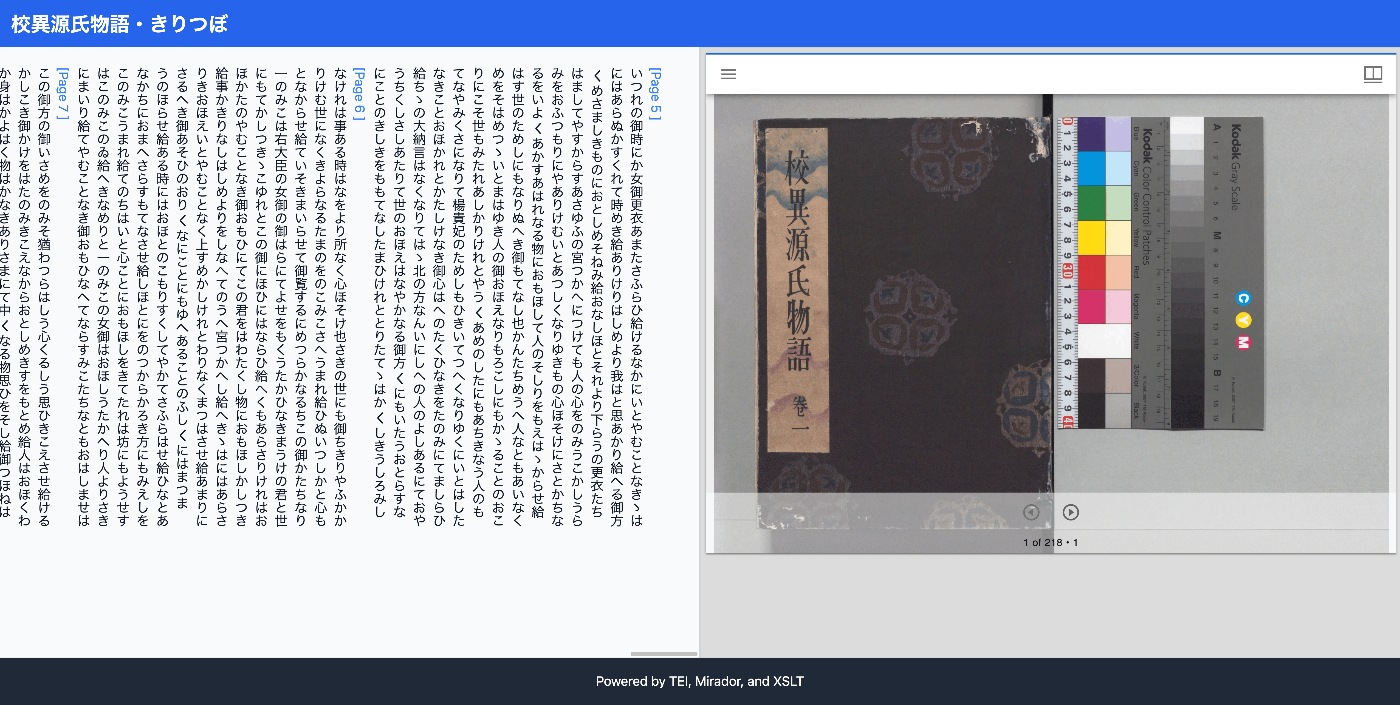
This time, I introduce an approach using only HTML and plain JavaScript.
Target Data
The target is the following Koui Genji Monogatari Text DB.

Implementation
The source code is published in the following repository.
 GitHub
Implementation Highlights
1. Processing pb Tags Using CETEIcean's behaviors
The following code defines the click behavior of pb tags using CETEIcean's behaviors.
ct.addBehaviors({
  tei: {
    // Hide unnecessary elements
    graphic: () => document.createDocumentFragment(),
    figure: () => document.createDocumentFragment(),

    // Processing pb tags
    pb: function (el) {
      let pb = document.createElement("tei-pb");

      // Inherit attributes
      if (el.hasAttribute("n")) {
        pb.setAttribute("n", el.getAttribute("n"));
      }

      // Get zoneId from corresp attribute
      const corresp = el.getAttribute("corresp");
      if (corresp) {
        const zoneId = corresp.replace('#', '');
        pb.setAttribute("data-zone-id", zoneId);
      }

      // Display page number
      const pageNum = el.getAttribute("n") || "";
      pb.textContent = `[Page ${pageNum}]`;

      // Add click event
      pb.addEventListener("click", function() {
        const zoneId = this.getAttribute("data-zone-id");
        if (zoneId) {
          const zoneElement = document.querySelector(`tei-zone[id="${zoneId}"]`);
          if (zoneElement) {
            const surfaceElement = zoneElement.closest("tei-surface");
            if (surfaceElement && surfaceElement.hasAttribute("sameAs")) {
              goToPage(surfaceElement.getAttribute("sameAs"));
            }
          }
        }
      });

      return pb;
    }
  },
});
2. Page Navigation in Mirador
When a pb tag is clicked, the Canvas URI is obtained from the TEI/XML file, and Mirador page navigation is executed.
// Variable to store the Mirador instance
let miradorInstance;

// Page navigation function
function goToPage(canvasUri) {
  if (miradorInstance) {
    miradorInstance.store.dispatch(
      Mirador.actions.setCanvas('window-1', canvasUri)
    );
  }
}
3. Using CETEIcean's CSS
Text styling uses the CSS provided by CETEIcean.
<link rel="stylesheet" href="https://teic.github.io/CETEIcean/css/CETEIcean.css" />
Summary
This article introduced one approach to developing TEI/XML viewers using HTML and plain JavaScript.
I hope you will consider various methods, including using frameworks like Next.js or utilizing XSLT without a viewer, while referencing this approach.

Comments
…