Overview
This is a memo on how to set subtitles on videos using iiif-prezi3.
Creating Subtitles
Subtitle files were created using the OpenAI API. The video file is converted to an audio file.
from openai import OpenAI
from pydub import AudioSegment
from dotenv import load_dotenv

class VideoClient:

    def __init__(self):
        load_dotenv(verbose=True)
        api_key = os.getenv("OPENAI_API_KEY")
        self.client = OpenAI(api_key=api_key)

    def get_transcriptions(self, input_movie_path):
        audio = AudioSegment.from_file(input_movie_path)

        # Write audio to a temporary file
        with tempfile.NamedTemporaryFile(suffix=".mp3") as temp_audio_file:
            audio.export(temp_audio_file.name, format="mp3")  # Export in MP3 format
            temp_audio_file.seek(0)  # Reset file pointer to the beginning

            # Get transcript with Whisper API
            with open(temp_audio_file.name, "rb") as audio_file:

                # Get transcript with Whisper API
                transcript = self.client.audio.transcriptions.create(
                    model="whisper-1",
                    file=audio_file,
                    response_format="vtt"
                )

                return transcript
Data Used
"Kensei News Volume 1" (Nagano Prefectural Library) is used.

県政ニュース 第1巻
昭和30年に長野県が制作した記録映像。次の8タイトルを収録する。
「地方選挙終る」、「地方選挙後初の県議会開かる」、「三十年度を賄う県のお台所」、「すすむ土木建設」、「明るく正しく健やかに」、「幕をとじた善光寺の御開帳」、「勇ましい水防訓練」、「お国じまん民謡大会」
Reflecting in the Manifest File
Assuming a manifest file has already been created, referencing the following article among others.
Creating IIIF v3 Manifests for Video Using iiif-prezi3
Creating IIIF v3 Manifests for Video Using iiif-prezi3
The following script adds the VTT file to the manifest file.
from iiif_prezi3 import Manifest, AnnotationPage, Annotation, ResourceItem, config, HomepageItem, KeyValueString

#| export
class IiifClient:

    def load_manifest(self, manifest_path):
        with open(manifest_path, "r") as f:
            manifest_json = json.load(f)

        manifest = Manifest(**manifest_json)

        return manifest


    def add_vtt(self, manifest_simple_path):
        manifest = self.load_manifest(manifest_simple_path)

        vtt_url = f"{self.prefix}/video.vtt"

        canvas = manifest.items[0]

        vtt_anno_page = AnnotationPage(id=f"{canvas.id}/page2")
        canvas.annotations = [
            vtt_anno_page,
        ]

        vtt_body = ResourceItem(id=vtt_url, type="Text", format="text/vtt")
        vtt_anno = Annotation(
            id=f"{vtt_anno_page.id}/a1",
            motivation="supplementing",
            body=vtt_body,
            target=canvas.id,
            label = "WebVTT Transcript (machine-generated)"
        )
        vtt_anno_page.add_item(vtt_anno)

        with open(f"{self.input_dir}/manifest_vtt.json", "w") as f:
            f.write(manifest.json(indent=2))
The following manifest file is created.
d1u7hq8ziluwl9.cloudfront.net
 d1u7hq8ziluwl9.cloudfront.net
{
"@context": "http://iiif.io/api/presentation/3/context.json",
"id": "https://d1u7hq8ziluwl9.cloudfront.net/sdcommons_npl-02FT0102974177/manifest.json",
"type": "Manifest",
"label": {
"ja": [
"県政ニュース 第1巻"
]
},
"requiredStatement": {
"label": {
"ja": [
"Attribution"
]
},
"value": {
"ja": [
"『県政ニュース 第1巻』(県立長野図書館)を改変"
]
}
},
"homepage": [
{
"id": "https://www.ro-da.jp/shinshu-dcommons/library/02FT0102974177",
"type": "Text",
"label": {
"ja": [
"信州デジタルコモンズ 県立長野図書館所蔵資料"
]
}
},
{
"id": "https://jpsearch.go.jp/item/sdcommons_npl-02FT0102974177",
"type": "Text",
"label": {
"ja": [
"ジャパンサーチ"
]
}
}
],
"items": [
{
"id": "https://d1u7hq8ziluwl9.cloudfront.net/sdcommons_npl-02FT0102974177/canvas",
"type": "Canvas",
"height": 480,
"width": 640,
"duration": 619.61962,
"items": [
{
"id": "https://d1u7hq8ziluwl9.cloudfront.net/sdcommons_npl-02FT0102974177/canvas/page",
"type": "AnnotationPage",
"items": [
{
"id": "https://d1u7hq8ziluwl9.cloudfront.net/sdcommons_npl-02FT0102974177/canvas/page/annotation",
"type": "Annotation",
"motivation": "painting",
"body": {
"id": "https://d1u7hq8ziluwl9.cloudfront.net/sdcommons_npl-02FT0102974177/video.mp4",
"type": "Video",
"height": 480,
"width": 640,
"duration": 619.61962,
"format": "video/mp4"
},
"target": "https://d1u7hq8ziluwl9.cloudfront.net/sdcommons_npl-02FT0102974177/canvas"
}
]
}
],
"annotations": [
{
"id": "https://d1u7hq8ziluwl9.cloudfront.net/sdcommons_npl-02FT0102974177/canvas/page2",
"type": "AnnotationPage",
"items": [
{
"id": "https://d1u7hq8ziluwl9.cloudfront.net/sdcommons_npl-02FT0102974177/canvas/page2/a1",
"type": "Annotation",
"label": {
"ja": [
"WebVTT Transcript (machine-generated)"
]
},
"motivation": "supplementing",
"body": {
"id": "https://d1u7hq8ziluwl9.cloudfront.net/sdcommons_npl-02FT0102974177/video.vtt",
"type": "Text",
"format": "text/vtt"
},
"target": "https://d1u7hq8ziluwl9.cloudfront.net/sdcommons_npl-02FT0102974177/canvas"
}
]
}
]
}
]
}
Viewer Display Example
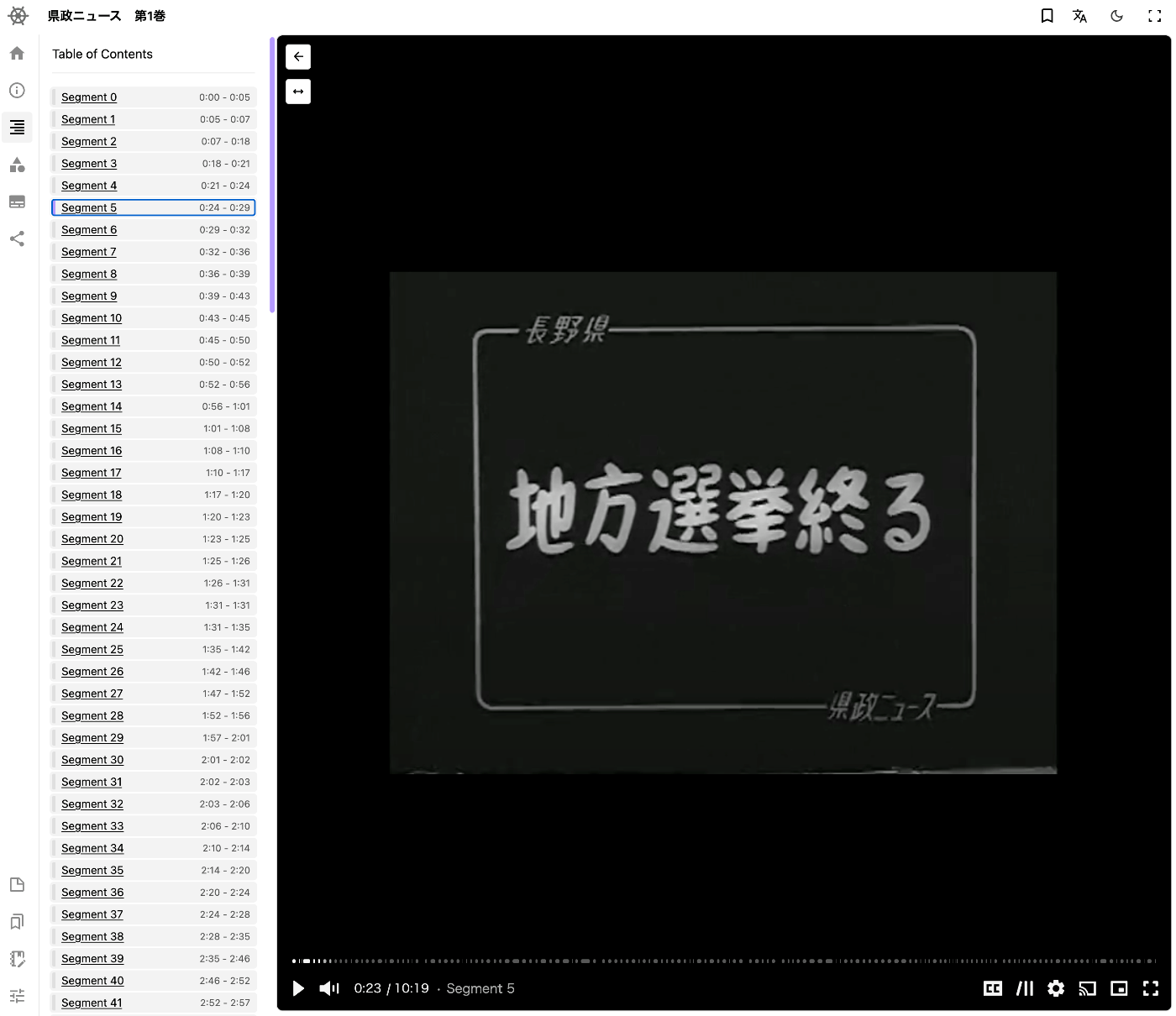
The following is an example of display in a viewer. Theseus Viewer is used.
Theseus Viewer
 theseusviewer.org
Summary
We hope this serves as a useful reference for setting subtitles on video files using IIIF.
Comments
…