This article was co-authored with generative AI. Facts have been checked against public documentation where feasible, but errors may remain. Please verify primary sources before relying on this for important decisions.
A "disk image" (a copy of media replicated bit-for-bit into a single file) — which appears in the accessioning of born-digital materials — and an ordinary "folder copy" differ in how much information they can preserve. To confirm this difference through actual behavior rather than concepts, I installed The Sleuth Kit and Brunnhilde on macOS (Apple Silicon) and ran each tool against a FAT16 test image I built myself. This is a record of that.
The documentation for digital preservation tools (Archivematica and BitCurator) mentions tools of digital-forensic origin such as fiwalk, tsk_recover, and bulk_extractor. To see how these differ from ordinary folder-based operations, I ran fls / icat / fiwalk / tsk_recover / mactime / mmls, along with Brunnhilde (which integrates Siegfried + ClamAV + bulk_extractor).
The environment I used was as follows.
| Item | Value |
|---|---|
| OS | macOS (Darwin 25.x, Apple Silicon / arm64) |
| The Sleuth Kit | 4.15.0 (Homebrew bottle, bundled with afflib 3.7.22 / libewf 20140816) |
| Brunnhilde | brunnhilde.py on a venv |
Siegfried (sf) / ClamAV / bulk_extractor | Homebrew |
What Is a "Disk Image"
It refers to a bit-for-bit copy of the contents of storage media (USB stick, floppy, HDD, CD/SD, etc.) into a single file — not only the visible files, but also deleted files, free space, and filesystem metadata (creation, modification, and access times). Formats include raw (dd), E01 (EnCase), and AFF.
Whereas an ordinary file copy (dragging in Finder or cp -R) carries only "the contents of the visible files," a disk image carries "the current state of the media as a physical object." This difference can be observed in the experiments that follow.
graph LR
    M["Storage media<br/>USB / floppy / HDD"]
    M -->|"cp -R / Finder"| F["Folder copy"]
    M -->|"dd / imager"| D["Disk image"]
    F --> F1["Contents of visible files only"]
    D --> D1["Visible files"]
    D --> D2["Deleted files"]
    D --> D3["Free space / slack space"]
    D --> D4["FS metadata / exact timestamps"]
Figure 1: Copying versus imaging carry different amounts of information from the same media.
Installing Sleuth Kit
I installed it with brew install sleuthkit. Its dependencies openssl@3 / afflib / libewf / sqlite are installed, and the sleuthkit 4.15.0 binary itself is unpacked. What I wanted to confirm was whether fiwalk was bundled. fiwalk is a tool that walks the filesystem and outputs DFXML (Digital Forensics XML, described later), but depending on the build it is sometimes not included.
$ fiwalk -V
SleuthKit Version: 4.15.0
AFFLIB Version:    3.7.22
LIBEWF Version:    20140816
This build included it. fls, mmls, icat, tsk_recover, tsk_gettimes, mactime, and others are also present in /opt/homebrew/opt/sleuthkit/bin.
Building a Test Disk Image
Rather than using real media, I create a FAT16 image that simulates the accessioning of old media. The procedure is to write four files, delete one of them, and then finalize the image. Later I will check whether the deleted file remains in the image.
On macOS, newfs_msdos cannot format a raw file directly; it demands a device and stops with Inappropriate ioctl for device. So I first turn the file into a device with hdiutil attach -nomount, then format it.
# A 20MB empty image
dd if=/dev/zero of=OLDMEDIA.img bs=1m count=20

# Attach the raw image as a device (without mounting)
DEV=$(hdiutil attach -imagekey diskimage-class=CRawDiskImage -nomount ./OLDMEDIA.img | awk 'NR==1{print $1}')

# Format the device as FAT16
newfs_msdos -F 16 -v OLDMEDIA "$DEV"

# Mount it, write the material files, and delete one
diskutil mount "$DEV"
#   Create 本文.txt / 台帳.csv / 写真/IMG_0001.jpg / 削除予定.txt
#   → rm 削除予定.txt
diskutil unmount "$DEV"; hdiutil detach "$DEV"
For the later observation of recovery and PII (Personally Identifiable Information) detection, I set the contents of 削除予定.txt to "消す前の秘密メモ。連絡先 03-1234-5678" ("A secret memo before deleting. Contact: 03-1234-5678").
Deleted Files Are Visible and Readable
First I check the image's basic properties.
$ img_stat OLDMEDIA.img
Image Type: raw
Size in bytes: 20971520

$ fsstat OLDMEDIA.img | head
File System Type: FAT16
Volume Label (Boot Sector): OLDMEDIA
Next I enumerate all files. With fls -r (recursive) and -p (full path), deleted entries are marked with *.
$ fls -r -p OLDMEDIA.img
r/r 7:    本文.txt
r/r 11:   台帳.csv
d/d 15:   写真
r/r 1029: 写真/IMG_0001.jpg
r/r * 19: 削除予定.txt          ← * = deleted
r/r * 21: ._削除予定.txt
...
削除予定.txt is gone from Finder, but as a filesystem entry (inode 19) it still remains. Deletion in FAT is not "a delete flag being set"; rather, the first byte of the directory entry is overwritten with 0xE5 (a "not in use" marker) and the FAT cluster chain is freed. The data itself remains until it is overwritten. Because of this, icat can read its contents.
Before deletion  dir entry[ 削除予定.txt → cluster 5 ]
                 FAT      [5]→[6]→EOF
                 data     [cl5: 消す前の…][cl6: …87878]

After deletion   dir entry[ ?削除予定.txt ]   ← first byte becomes 0xE5
                 FAT      [5] free  [6] free    ← cluster chain freed
                 data     [cl5: 消す前の…][cl6: …87878]  ← contents intact → recoverable with icat
Figure 2: Deletion in FAT only marks the entry and frees the chain; the data region remains until it is overwritten.
Next, I read the contents of the deleted file directly.
$ icat OLDMEDIA.img 19
消す前の秘密メモ。連絡先 03-1234-5678
It reads out. Content that would have been considered nonexistent under a folder copy can be recovered from the image. This is an advantage for rescuing material, but at the same time it carries the risk of preserving and publishing even the personal information that a donor thought they had deleted.
To extract everything at once, use tsk_recover (with -e to include deleted items as well).
$ tsk_recover -e OLDMEDIA.img recovered
Files Recovered: 12
Although I wrote four files, twelve are output. The difference is the ._* (AppleDouble; resource forks and extended attributes) and .fseventsd/ (FSEvents log) that macOS writes to FAT. This shows that when media written on a Mac is imaged, macOS-derived metadata is taken in along with it.
DFXML — Metadata Usable for Preservation
fiwalk -X generates DFXML (Digital Forensics XML) that records each file's timestamps, size, hash, and physical location (the sectors where it is stored). Deleted files are included as well.
$ fiwalk -z -X OLDMEDIA.dfxml OLDMEDIA.img
$ wc -l OLDMEDIA.dfxml
577 OLDMEDIA.dfxml
In BitCurator and Archivematica, DFXML becomes an object to be preserved as a record of the media's state. This time a 577-line, roughly 16KB XML was produced, and it included the <filename>削除予定.txt</filename> entry.
To view it chronologically, tsk_gettimes | mactime can build a timeline. Deleted files are shown as (deleted).
$ tsk_gettimes OLDMEDIA.img | mactime -d | grep 削除
... 削除予定.txt (deleted)
An Image with a Partition Table
Most real media have a partition table. In a 30MB image, I create a single FAT16 partition using an MBR, and analyze it with mmls.
$ mmls PARTED.img
DOS Partition Table
      Slot      Start        End          Length       Description
002:  000:000   0000000063   0000061424   0000061362   DOS FAT16 (0x06)
We can see the partition starts at sector 63. To the filesystem-level tools, you pass this offset with -o.
$ fls -o 63 PARTED.img
r/r 6:  doc.txt
This is a two-stage approach: use mmls to find where in the whole image the filesystem is, then specify that offset to look inside (fls -o).
graph TD
    IMG["Whole disk image<br/>PARTED.img"] --> MMLS["mmls<br/>partition analysis"]
    MMLS -->|"FAT16 starts at sector 63"| FS["FAT16 partition"]
    FS --> FLS["fls -o 63<br/>enumerate files"]
    FS --> ICAT2["icat -o 63<br/>extract contents"]
    FS --> FW2["fiwalk<br/>generate DFXML"]
Figure 3: Sleuth Kit is split into the volume-system layer (mmls) and the filesystem layer (fls/icat/fiwalk); the latter takes -o <start sector>.
Processing Everything at Once with Brunnhilde
Brunnhilde bundles these tools and generates a report with a single command. With -d (disk image input), it processes directly from the image.
brunnhilde.py -d OLDMEDIA.img brunn_report
graph LR
    IMG["OLDMEDIA.img"] --> TR["tsk_recover<br/>rescue files"]
    TR --> FW["fiwalk<br/>DFXML"]
    TR --> CL["ClamAV<br/>virus scan"]
    TR --> SF["siegfried<br/>format identification"]
    TR -.->|"when -b is set"| BE["bulk_extractor<br/>PII extraction"]
    FW --> RPT["report.html<br/>+ csv_reports/"]
    CL --> RPT
    SF --> RPT
    BE -.-> RPT
Figure 4: Brunnhilde applies format identification, virus scanning, and (optionally) PII extraction to the rescued set of files all at once, producing a single report.
The log shows they are run internally in sequence.
INFO - Attempting to carve files from disk image using tsk_recover.
INFO - File carving successful.
INFO - Attempting to generate DFXML file from disk image using fiwalk.
INFO - DFXML file created.
INFO - Running virus scan. This might take a while...
----------- SCAN SUMMARY -----------
Known viruses: 3627875
Scanned files: 12
Infected files: 0
Time: 17.078 sec
INFO - No viruses found.
INFO - Running Siegfried. This might take a while...
INFO - Brunnhilde characterization complete.
tsk_recover (rescue) → fiwalk (DFXML) → ClamAV (virus scan; 3.62 million signatures, 12 files, 0 infected) → Siegfried (format identification) run in a chain, and report.html plus csv_reports/ (formats / mimetypes / years / duplicates / unidentified, etc.) were output. When you hand it an image, it generates a characterization report usable for accessioning decisions.
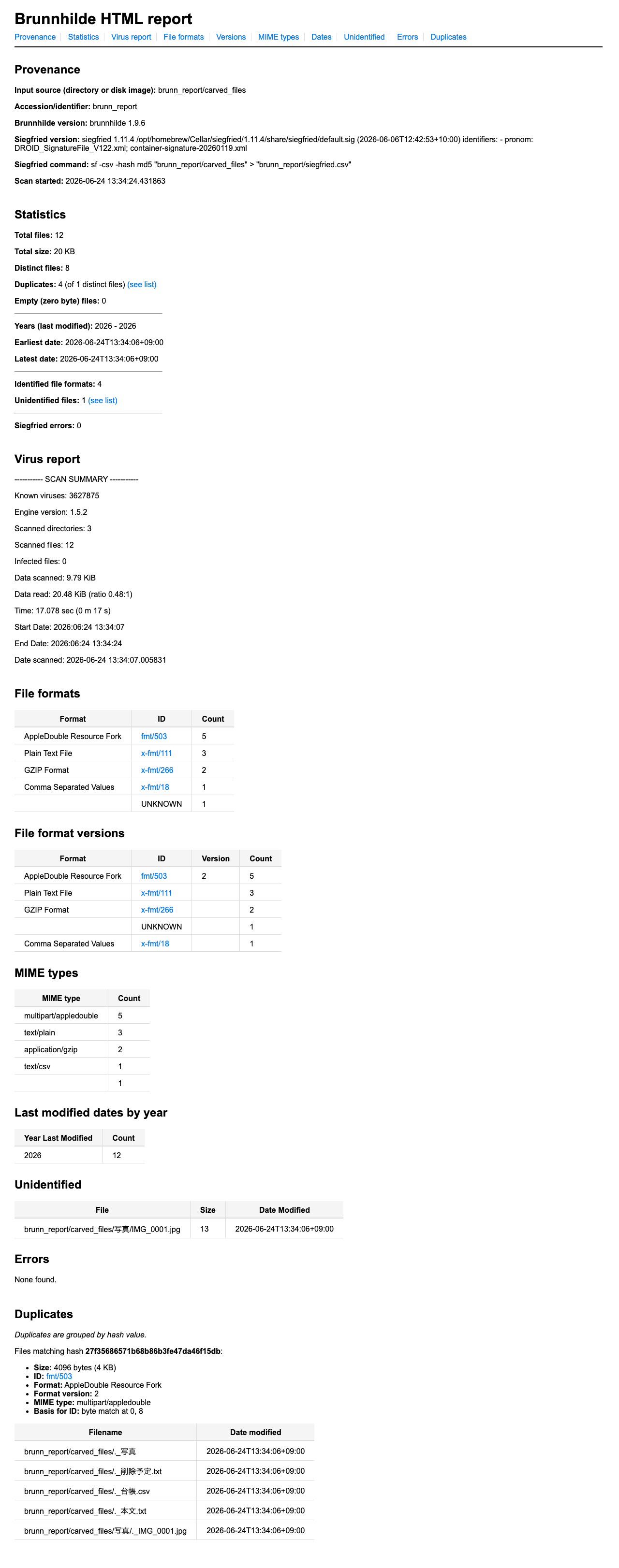
Figure 5: The generated report.html. The virus scan result (0 infected), Siegfried format identification (PUID), duplicate files, last-modified years, and more are gathered onto a single page.
Note that no virus specimen (such as EICAR) was created in this article. The scan is against harmless files, and the result is 0 infected.
bulk_extractor Did Not Extract Japanese Domestic-Format Phone Numbers
Brunnhilde can integrate bulk_extractor (which extracts PII such as credit card numbers, emails, and phone numbers from full text) with -b. I ran it against the rescued set of files (including 削除予定.txt, which contains a phone number).
$ bulk_extractor -R -o be_out brunn_report/carved_files
$ grep -vc '^#' be_out/telephone.txt
0          ← 0 phone numbers
$ grep -vc '^#' be_out/pii.txt
0
The file contains 03-1234-5678.
$ grep -r '03-1234' brunn_report/carved_files/削除予定.txt
消す前の秘密メモ。連絡先 03-1234-5678
Still, telephone came back with 0 hits. Reading the scanner's definitions (src/scan_accts.flex) reveals why 03-1234-5678 matches none of the rules.
- The North American rules require 3-3-4 digit groups.
03-1234-5678is 2-4-4, so it does not match. - The parenthesized form
(xxx)and the international form require a+country code. Domestic notation includes neither. - The "
0-leading rule" that could match domestic notation requires a continuous run of digits with no hyphens. Because it is broken up by hyphens, it does not match. - The keyword-prefixed rule requires an English
tel/fax/mobile, etc., immediately before. Here the preceding word is the Japanese "連絡先" ("contact"), so it does not match.
The hyphen separators and the Japanese context each defeat every rule that could have matched domestic notation. As far as I could confirm, bulk_extractor's phone-number scanner mainly targets North American and international formats, and does not straightforwardly match Japan's domestic notation (0AB-CDEF-GHIJ).
This is an example showing that installing a tool does not mean PII detection is done. When applying forensic tools developed abroad to Japanese-language materials, you will need adjustments or custom implementations for personal information that includes domestic phone numbers, postal codes, Japanese-era dates, and the like.
In What Cases Are These Tools Needed
Let me organize the observed facts.
- A disk image subsumes a folder copy. It can preserve deleted files, timestamps, and physical placement, and with
icatortsk_recoveryou can recover the contents of deleted items too. - However, this presupposes that the target is real media (or an existing image). In an operation that takes an already-copied folder as input, there is no deleted region and no original-media timestamps, so there is nothing for
fiwalkortsk_recoverto work on. - These tools are effective in two cases. (a) When you accession physical media (old floppies, USB sticks, HDDs, etc.) as physical objects and image them yourself with a write blocker and an imager (such as Guymager). (b) When a donor hands you a disk image (.E01 / .dd / .aff) itself. The latter must be treated as an image rather than a folder, so even in a folder-based operation the tools in this article become necessary. In either case, it is natural to place them as a separate workflow from an application that takes a directory as input.
- PII detection is not complete just by installing a tool. As the example of bulk_extractor not extracting Japanese phone numbers shows, Japanese-language materials require domestic-oriented detection logic.
The single dividing line for whether these are needed was whether you accession real media or disk images. In an operation that handles only already-copied folders, the forensic layer has no role to play.
References
- The Sleuth Kit / Brunnhilde / bulk_extractor
- BitCurator Docs — Tools
- Generate Filesystem Metadata as DFXML (BitCurator)
- Walker Sampson, "Disk Imaging Workflow" (BitCurator blog)
- Towards Best Practices in Disk Imaging (Electronic Media Review, 2019–2020)
- The Code4Lib Journal — A Web Service for File-Level Access to Disk Images
Comments
…